


 Try for Free
 Try for Free
Last updated on 2026-01-26, by
Best Ways to Screen Record HBO Max Safely
Summary:
If you’re struggling with how to screen record HBO Max, then you definitely shouldn’t miss this article! This article will introduce three methods to record video on HBO Max.
MenuCLOSE
HBO Max is a streaming service platform launched by Warner Bros. Discovery, with its core feature being the integration of vast content from well-known film and TV brands such as HBO, Warner Bros., the DC Universe, and Discovery. It can be accessed on various devices, including smart TVs, smartphones, tablets, and gaming consoles. HBO Max attracts millions of users worldwide with its extensive content library, making it a comprehensive entertainment platform with global reach. As it becomes increasingly popular, the demand for recording HBO Max has also grown, mainly due to unstable network conditions, the need to watch offline while traveling, or simply for personal collection purposes, with users often wanting to record their favorite shows. However, due to DRM protection, directly recording streaming content is not easy. This article will tell you how to screen record HBO Max, helping users find a suitable solution while respecting copyright.
Part 1: HBO Max Built-In or Official Method
Through the official HBO Max, you can also achieve the purpose of offline viewing. However, this is accomplished through its built-in official download function, as HBO Max does not offer a recording feature. By the download function, users can download specific programs and movies to their local devices, which can be regarded as the most direct way to achieve offline viewing. However, this function has some cons. To help you have a clearer understanding of this method, I will list its pros and cons.
Pros:
- Completely legal. This is the officially approved method for offline viewing, and you don’t need to worry about copyright infringement issues.
- Operation is simple. You can download it directly within the app with just one click, without the need for additional tools or complex settings.
- Quality stability. The downloaded content usually offers stable picture quality.
- Easy management. The downloaded content can be uniformly managed within the application.
Cons:
- Device limitations. The download function is mainly supported by mobile devices. Most smart TVs, game consoles and other large-screen devices do not support it.
- Validity limit. The downloaded content has a viewing period. For instance, some content may become invalid after 48 hours.
- Format can’t be converted. The downloaded file is in an encrypted format and can only be played within the HBO Max application. It cannot be converted into a common video file or used in other players.
- Content restrictions. Not all programs offer download access. Only the content that is permitted for download can be accessed.
Part 2: Built-In Screen Recording on Different Devices
Considering that some users can’t accept the limitations of the official download function, and wondering if there are other methods to safely record HBO Max without using third-party tools, I have made a simple operation sharing based on the built-in recording tools of different devices.
1. On Windows PC
The Xbox Game Bar that comes with Windows PC can perform screen recording. Simply press the “Win+G” while playing an HBO Max video to invoke the Game Bar, and then click the recording button. This is undoubtedly a very simple method for Windows PC users, but the key point is that it is subject to DRM restrictions. If you want to use Xbox Game Bar to record content protected by DRM on HBO Max, it will trigger the platform’s protection mechanism. The recording window will display a black screen, solid color blocks, or a prompt stating that recording is prohibited due to copyright protection, ultimately resulting in a failed recording or obtaining an invalid file.
2. On Mac
For Mac users, they can use QuickTime Player to record the screen. The operation is also very simple. After opening QuickTime Player, you first click “File” and then click “New Screen Recording”. After adjusting the recording area, click the recording button. However, it is also subject to DRM restrictions, similar to the situation I mentioned above. If you try to record protected content, the recording area will turn into a black screen, unable to capture the actual video picture and sound.
3. On Mobile
If you are a mobile phone user, using the built-in recording function of your phone is much simpler. However, it should be noted that there are subtle differences between iOS and Android systems. For example, iOS users only need to add a “Screen Recording” to the Control Center. To record system audio, they need to long-press the recording button and enable the “Microphone”. For Android users, even if the phone brands are different, they can usually find the “Screen Recording” in the Quick Settings panel. Although it is very simple, these built-in recording tools of these systems cannot avoid being affected by DRM, resulting in very limited content that can be recorded, and if the microphone is occupied by other applications, screen recording may not be enabled. A long recording process will consume a large amount of system resources, potentially causing the device to overheat, application lag, and ultimately resulting in a very large video file size.
Part 3: Third-Party Tools
Although the two methods mentioned above are very simple, they have quite a few limitations. This makes them unsuitable for users with higher recording needs and higher requirements for recording quality. For these users, I recommend using professional third-party tools to screen record Max.
1. CleverGet Recorder
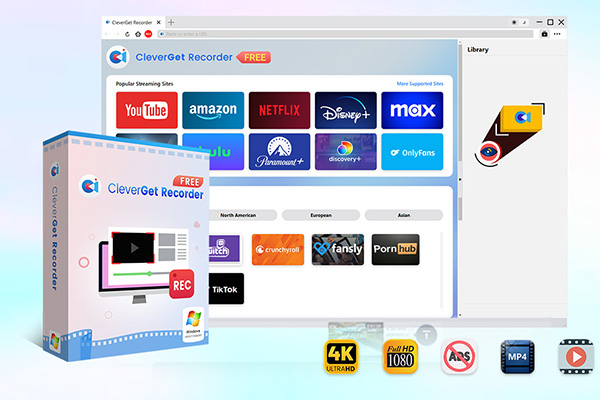
CleverGet Recorder is a free streaming video recorder that supports recording from most streaming platforms, including HBO Max. It can record on-demand content and live streams in their original quality, including ad-free DRM-protected streaming videos, supporting up to 4K resolution and 60FPS, and can convert HBO Max shows to MP4 or MKV. It also features presets for recording duration and no limits on viewing time, among other functions. Here are the specific steps:
Step 1: Download and install CleverGet Recorder.
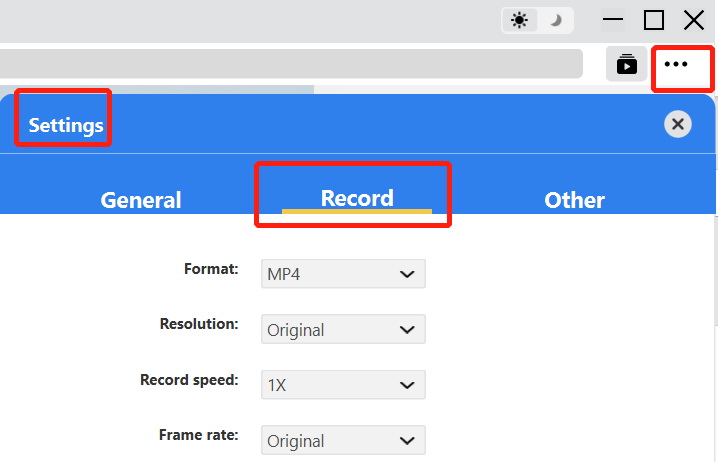
Step 2: Click the three-dot menu at the top right of the interface and adjust the settings according to your personal needs.
Step 3: Open the HBO Max website directly on the main page.
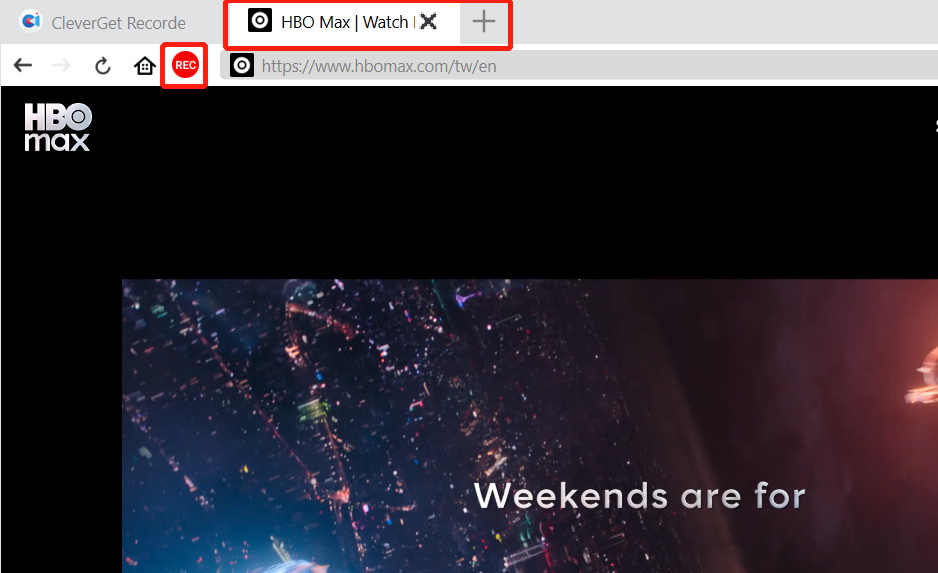
Step 4: Play the video you want to record and click “REC” in the top left corner of the interface.
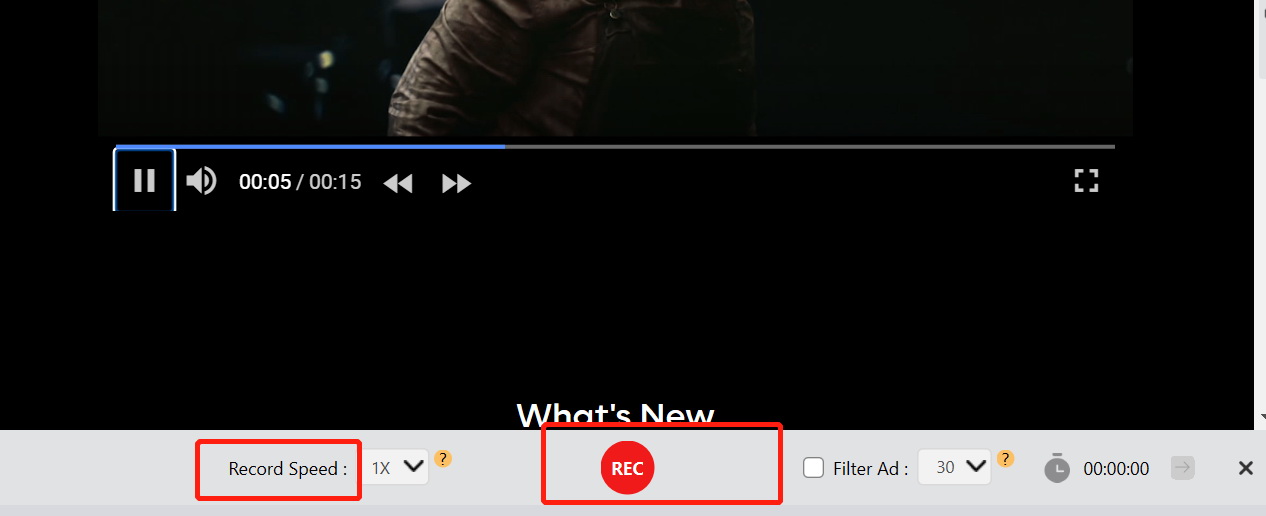
Step 5: After selecting the desired recording speed, click the “REC” button at the bottom to start recording.
Step 6: After recording, you can manage it in the “Library”.
-
Free streaming video recorder to record online on-demand video and live streaming video without quality loss and cost.
- 100% free to use.
- Record movies, TV shows, game streams, lectures, live concerts, etc.
- Record up to 4K video with 60FPS in MP4 or MKV.
- Schedule recording upon preset recording length.
- No watermark, no time limit, and ad-skipping (beta).
2. Leawo Free Screen Recorder
Leawo Free Screen Recorder is also a free screen recording software that supports recording HBO Max. It can record the full screen, a custom area, or a specific window, and can produce screen recordings in up to 4K without watermarks. It features options for setting recording duration, real-time drawing, and adding background music. Here are the specific steps:
Step 1: Download and install Leawo Free Screen Recorder.
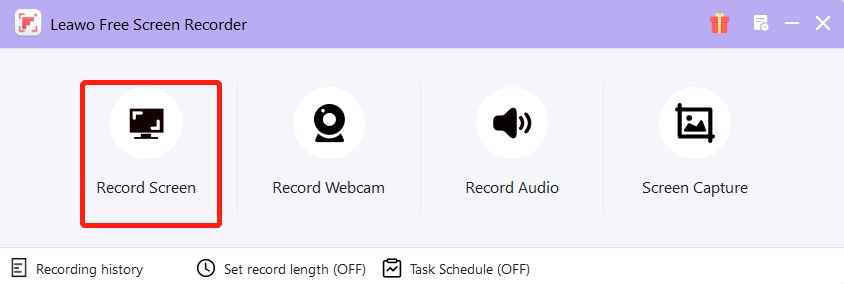
Step 2: Click “Record Screen” and select the area you want to record.
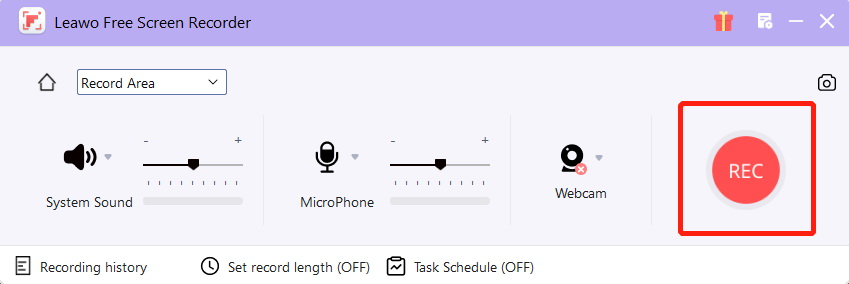
Step 3: After setting up the system sound and microphone, press “REC” to start recording.
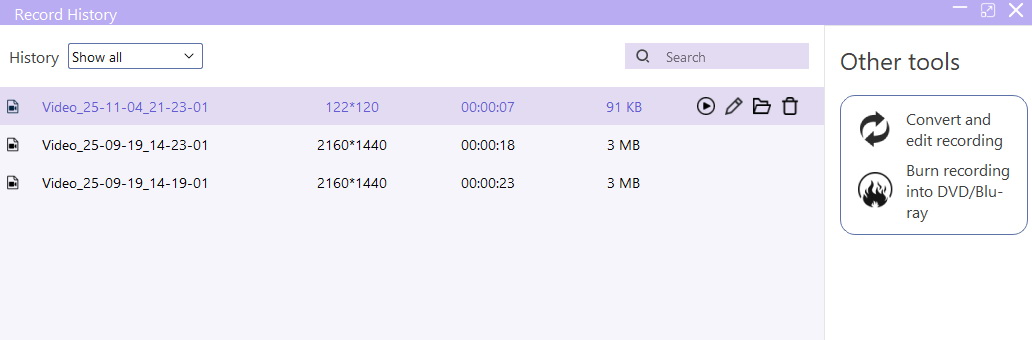
Step 4: The recorded content can be found in “Record History”.

-
4-in-1 screen recorder suite to record gameplay, tutorial, training video, lecture, reaction video, webinar video, etc.
- Free online recorder to record window, browser tab or entire screen online.
- Free screen recorder to record screen in full-screen or custom area at up to 4K to MP4.
- Free webcam recorder to record webcam video.
- Free audio recorder to record audio from microphone or computer to MP3.
- Free screenshot snapper to snap a screenshot to JPG.
Part 4: Tips for Safe Recording Practices
1. Use Official Download Options Whenever Possible
When the demand for recording is not high, the official download option can be given priority. This is because it is the safest and most stable method, which can completely avoid copyright risks and technical issues, and no additional software needs to be installed.
2. Avoid Sharing or Distributing Recorded Content
The recorded content must not be distributed, shared or used for commercial purposes to avoid infringing upon relevant copyright rights. This is especially true when you use third-party tools for recording.
3. Keep Recordings for Personal Use
The purpose of the recording should be for the individual to be able to watch it offline, rather than for others to remix and distribute it. If there is a need for distribution, it must be done with the permission obtained.
4. Check Device Storage and Screen Recording Settings
Before using the screen recording function, make sure that your device has sufficient storage space and that the recording resolution, frame rate, audio source, etc., have been set according to your preferences to avoid recording failures or obtaining unsatisfactory files.
Part 5: Conclusion
About how to screen record on Max, there are three methods: the download function provided by the platform, the built-in recording tool on the device, and the third-party recording tool that needs to be downloaded. If you prefer the download method, in addition to the official download function, you can also use other download tools, such as the one I often use, CleverGet HBO Max Downloader. It can download the content of HBO Max without any problem, and it doesn’t have to be subject to the restrictions of the official download function. However, it should be noted that no matter which method you choose, respecting copyright is the responsibility of every user.
-

Most Popular Facebook Story Viewers Rank & BeyondPatrick Murray/2026-06-03
-

Is YouTube Smart Downloads Good or You Should Try Something Smarter?Patrick Murray/2026-06-03
-

How to Save Money on Discovery Plus SubscriptionSunny Wen/2026-05-28
-

ScreenRec Review: Is It Truly Free and Watermark-Free?Sunny Wen/2026-05-28
-

Can You Still Get a Free Trial on Discovery+?Sunny Wen/2026-05-20
-

Easy Guide: How to Burn Amazon Prime Videos to DVDs?Patrick Murray/2026-05-09
-

Where Are Amazon Prime Video Downloads Stored on PC/MobilePatrick Murray/2026-05-08
-

Sling TV or FuboTV: Which One Should You Pick?Sunny Wen/2026-05-11
-

Can You Share a Disney Plus Account with Different Households?Sunny Wen/2026-04-16
-
How to Use Loom Video Recorder for Quick Screen RecordingSunny Wen/2026-04-16
-

How to Download OnlyFans Videos from Messages?Patrick Murray/2024-05-09
-

[2026] What is OnlyFans Media not Loading Issue & How to Fix?Patrick Murray/2024-02-21
-

How to Download OnlyFans Videos on Android/iPhone/PC?Patrick Murray/2024-06-28
-

How to Download Private YouTube Videos Without AccessPatrick Murray/2025-02-12
-

How to Download YouTube Members-Only Videos?Cassie J./2024-05-08
-

Latest List of the Best Free Movie Websites[2026]Patrick Murray/2024-05-07
-

[2026 Update] How to Download All Media from OnlyFans?Patrick Murray/2024-02-26
-
TK2DL: Features and Uses of this TikTok & Twitter DownloaderLeia Liu/2024-09-05
-

10 Best HDHub4u Alternative Sites for Movie DownloadPatrick Murray/2024-03-06
-
How to Turn Off Age Restriction on YouTube?Patrick Murray/2024-03-04
 English
 Deutsch
 日本語
日本語 French
 한국인
한국인 Italiano