


 Try for Free
 Try for Free
Share article:


Where Are Amazon Prime Video Downloads Stored on PC/Mobile

2026-05-08 ・ Related to: CleverGet Amazon Downloader
91 Views
Summary:
All Amazon Prime Video downloads are stored in hidden, encrypted folders and can be viewed only on the app on your device. If you want to watch downloaded titles offline more freely, you can consider tool like CleverGet Amazon Downloader.
If you are downloading movies or TV series via the Amazon Prime Video application, there could be questions about where such movies are saved and whether you can move them out of the Prime Video application and watch them elsewhere.
The answer is not necessarily straightforward, as Prime Video saves the downloads differently on PC and mobile devices. In this article, we will discuss where your Prime Video downloads are saved, how it works, and what you are and are not allowed to do with the downloaded files.
MenuCLOSE
1. Where Are Amazon Prime Video Downloads Stored on PC?
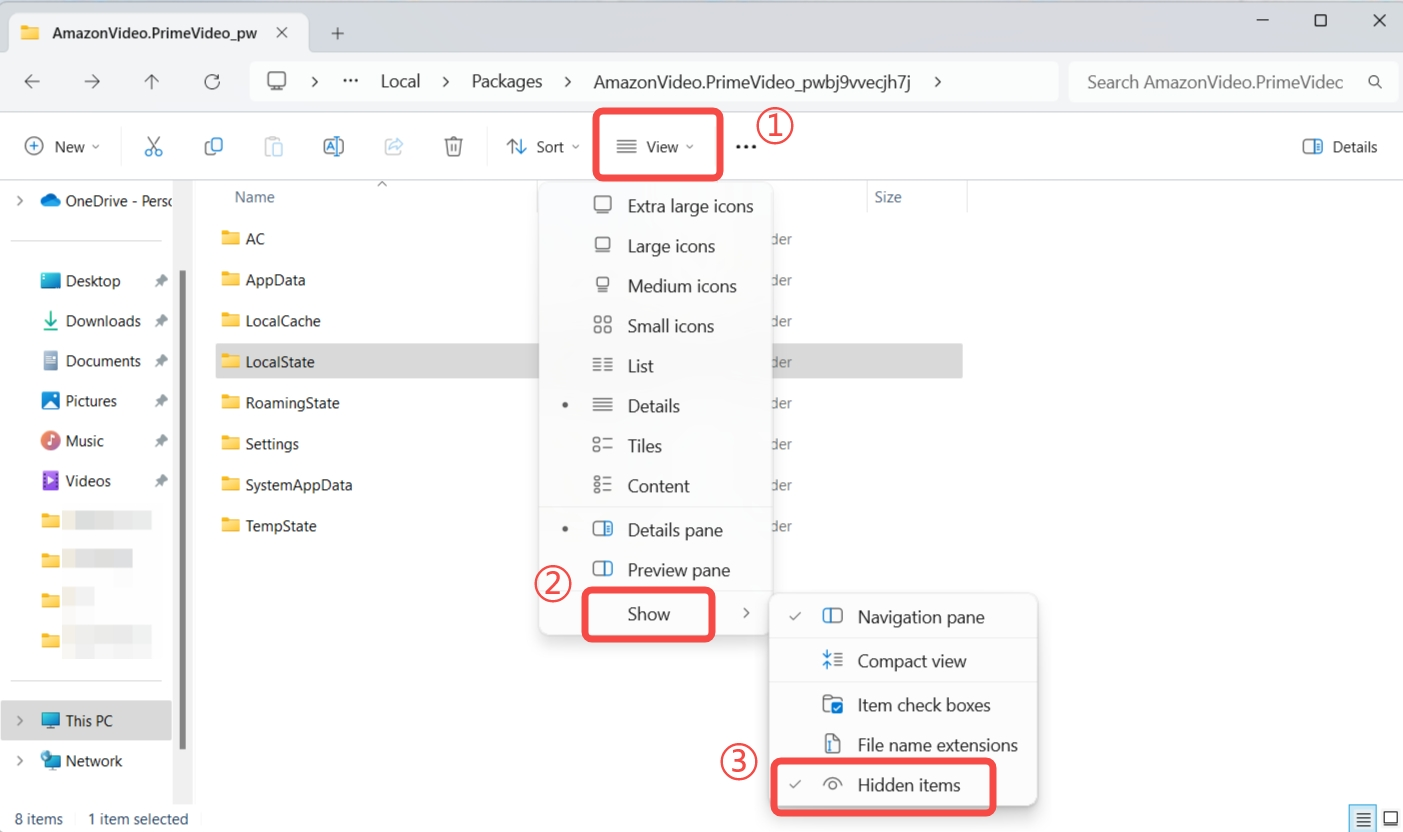
If you use the Amazon Prime Video service to download movies and series on a Windows PC, your video downloads do not go to a standard folder location (like Pictures and/or Videos). Instead, they download into an internal system folder location that is hidden from your view and owned by the streaming application’s program. To locate the downloaded video information, you may need to access hidden files and folders in the following way: In most cases, the downloads are located in a protected folder like this:
C:\Users\[YourName]\AppData\Local\Packages\AmazonVideo.PrimeVideo_pwbj9vvecjh7j\LocalState\Downloads
This folder is hidden by default, so you need to enable hidden items in File Explorer before you can access it.
On Windows 10
- Step 1: Using Windows Explorer, go to the top of the screen, select View, and then go to Options.
- Step 2: In the Folder Options box, check the box for Show hidden files, folders, and drives, then click on Apply and OK.
- Step 3: Now paste the folder path into the address bar (make sure to replace “Users” with your actual username) to access the downloads.
On Windows 11
- Step 1: Open File Explorer and go to View.
- Step 2: Next, go ahead and click Show, then enable Hidden items.
- Step 3: Paste the same folder path into the address bar to locate the files.
2. Where Are Amazon Prime Video Downloads Stored on Mobile?
When it comes to downloads via the Prime Video application on your phone, there is a difference between Android and iPhone devices. In general, downloaded videos will be located in app directories and are more difficult to find compared to regular video files.
On Android Devices
Prime Video downloaded files are located in a hidden directory. You can find them via the File Manager app.
- Step 1: Launch File Manager application on your Android phone.
- Step 2: Go to internal storage and look for the path:
Android/data/com.amazon.avod.thirdpartyclient
or
/data/data/com.amazon.avod.thirdpartyclient
On iPhone (iOS Devices)
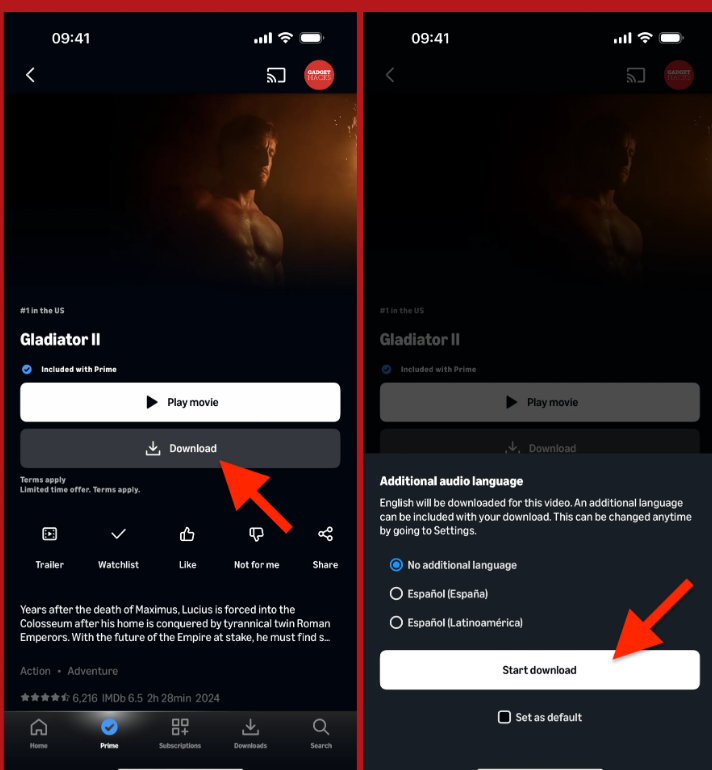
Unfortunately, there is no option to access downloaded videos via Files application or folders on iPhone. Everything remains within the Prime Video app only.
To view your downloads:
- Step 1: Open the Amazon Prime Video app.
- Step 2: Tap the “Downloads” section at the bottom.
- Step 3: From there, you can watch, manage, or delete your downloaded videos directly.
3. Can I Find Prime Video Downloads on MAC?
On a Mac, Amazon Prime Video downloads will go into a hidden and encrypted format. Like all other devices, you can’t play these files like regular video files. The files will be useful within the app only; you can also access them through your standard file locations.
Steps to Find Prime Video Downloads on Mac
- Step 1: First, open Finder on your Mac.
- Step 2: Now, in the top menu, click Go, then select Go to Folder.
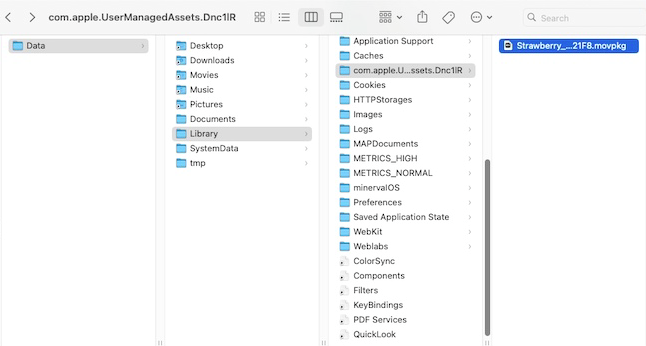
- Step 3: Next, type ~/Library and press Enter.
- Step 4: Navigate through this path:
Containers > Prime Video > Data > Library > com.apple.UserManagedAssets
Now, here you can see the downloaded files, but they are DRM-protected.
4. Download Prime Video Titles to Anywhere You Want
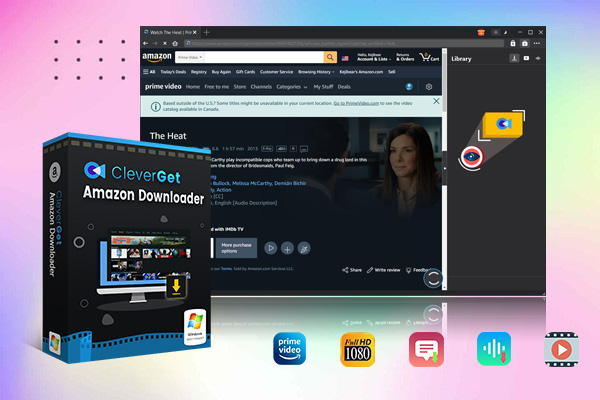
Since Amazon Prime Video downloads are normally locked inside the app, you can not play them anywhere. But if you download Prime Video with a third-party tool in common formats, then you can watch them anywhere. One such option is CleverGet Amazon Downloader, designed to download Amazon Prime Video content to a computer for personal offline use.
This program allows you to save Amazon Prime movies and TV shows to your PC in MP4/MKV format. It’s converting Prime videos to common media files for you instead of using app-locked format. You can select the desired video quality, audio, and subtitles, with all the customization options that you have. There are integrated browser windows built in, so you don’t have to jump between programs and browser windows. If you’re a TV fan, you can download entire seasons or just your favorite episodes with its batch downloading feature.
Step 1: Get CleverGet Amazon Downloader
First, download CleverGet Amazon Downloader from the official website and install it on your computer. Once installed, open it and then log in to your Amazon Prime account.
-
- Download Amazon Prime video to MP4/MKV.
- Batch download Amazon Prime Video TV episodes across seasons.
Step 2: Locate Amazon Prime Video
Once logged in, look for movies, TV shows, and other Prime Video content. Once you find the video you want to download, just click the download button, and it will start CleverGet video analysis.
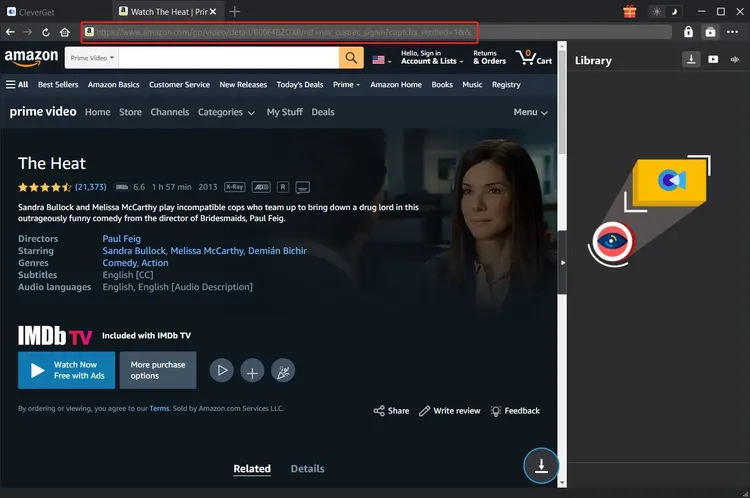
Step 3: Choose Video Settings
Next, you will see the download option once CleverGet analyzes the video. Next, you can choose the resolution, audio track, subtitle language, etc.
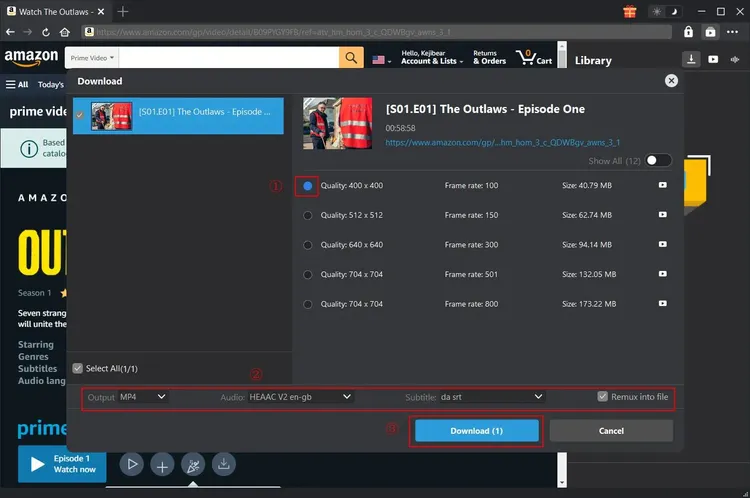
Step 4: Begin Downloading
Next, just click the download button. The video will start downloading. Within just a few minutes, your video will be ready to watch offline.
With the simple steps above, you can download Amazon Prime videos with CleverGet Amazon Downloader. It is quick, trustworthy, and retains the original quality of video and audio.
Conclusion
So, here’s the deal: Amazon Prime Video downloaded files will go to your device’s folders, depending on your device type. Whether you’re on a PC, Android phone, iPhone, or Mac, the files are usually encrypted. That means you can only watch them in the Prime Video app, not outside of it.
Because of these limitations, many users seek more flexible ways to save and manage their content. If you need more control over your downloads, you can use tools like CleverGet Amazon Downloader. It allows you to save Prime Video movies and shows. You can choose common formats like MP4 or MKV. Select the video quality. Also, you can keep subtitles or audio tracks as you prefer. This solution is more flexible than the built-in app system. Once downloaded, you can see all your favorite Prime Video content in offline mode, anywhere, anytime.
CleverGet Amazon Downloader

 Try for Free
 Try for Free
 Download Amazon Prime movies and TV shows.
Support batch Amazon Prime video downloads.
Download Amazon Prime videos to 1080P MP4/MKV.
Save subtitles and audio tracks.
Save subtitles as SRT/SUP or pack into video.
Remove ads during Amazon Prime video downloads.
 English
 Deutsch
 日本語
日本語 French
 한국인
한국인 Italiano