


 Try for Free
 Try for Free
Last updated on 2026-06-03, by
Is YouTube Smart Downloads Good or You Should Try Something Smarter?
Summary:
Find out if YouTube Smart Downloads is truly effective for offline viewing, or if you should consider more advanced downloading solutions.
YouTube Smart Downloads is a feature of YouTube Premium that lets you save videos to your device, based on the videos you’ve watched and recommended by YouTube. It aims to make it easier to watch offline content by downloading specific videos that YouTube feels you will be interested in.
For the latest app versions, a lot of customers have reported that this feature is now on auto by default and begins downloading videos in the background. Although it might be convenient, it comes with some concerns related to storage, lack of control, and low video quality. In this article, we will share what the YouTube Smart Download feature is, how you can disable it, and a smarter approach to downloading YouTube videos that will help you manage the download process with more control and quality.
OutlineCLOSE
1. What is the YouTube Smart Downloads Feature?
YouTube Smart Downloads is a feature for YouTube Premium subscribers that automatically downloads videos to your device based on your viewing history and recommendations. YouTube does not allow you to choose specific videos to add to your offline video library, but rather it adds videos that you can find interesting.
This might appear useful initially since you will always have something to watch without the need to search or manually download anything. But there are many users who have complained of this feature, particularly if it is activated automatically on a mobile device. It can consume storage space in the background, and users might not know what is being downloaded.
Quality and control are also common issues with this feature. Videos are automatically selected, so users do not always have a choice of what gets saved, and the offline content may not always be the content that they prefer. This is a major reason why many users begin to search for methods to disable Smart Downloads and control downloads manually.
2. Why Should You Turn off YouTube Smart Downloads?
At first glance, YouTube Smart Downloads could be a helpful feature since it automatically downloads videos to view offline. But in reality, it does not always function as the user thinks it should.
One of the main issues is that the feature is based on YouTube’s recommendation system. It is algorithm-driven rather than user-selected, so sometimes it might download videos you’re not interested in. If you have limited space on your device, the unwanted content can fill up your device’s space.
Another common problem is related to video quality and playback control. In some cases, users experience issues where videos downloaded through Smart Downloads are locked to a specific quality. For instance, if a video is set to low resolution, you might not be able to switch it while viewing offline, or even switch back to streaming mode, and this can create a “Quality Unavailable” situation.
3. How to Turn off YouTube Smart Downloads?
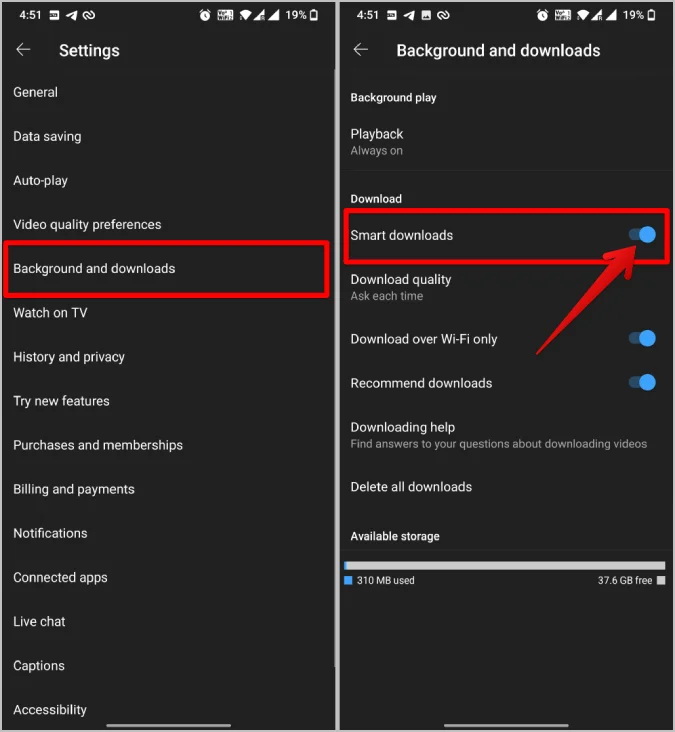
The Smart Downloads feature can be easily disabled in the YouTube settings menu. Follow the steps below to disable and prevent Automatic Video Downloads.
- Step 1: In the YouTube app, tap on the profile icon at the bottom-right corner of the screen.
- Step 2: Open Settings. Click the gear (Settings) icon in the profile menu top-right corner.
- Step 3: Go to the Settings menu and choose Background & Downloads.
- Step 4: Find the Smart Downloads toggle and turn it off to disable the feature.
4. The Smarter Way to Download YouTube Videos
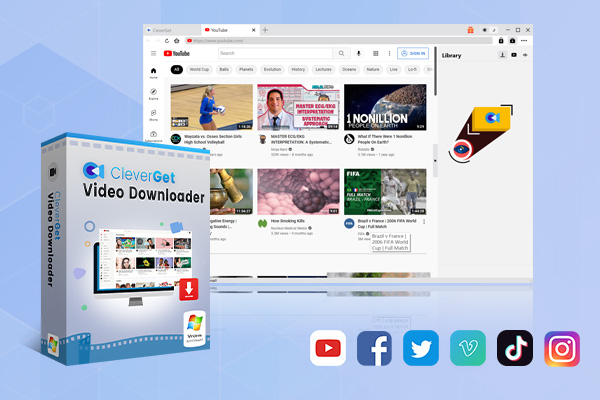
If you want more control over your downloads and better quality options, tools like CleverGet Video Downloader can be a smarter alternative. It allows you to download YouTube videos, playlists, movies, and even live streams in high resolutions such as MP4 or MKV, giving you a much more flexible offline viewing experience compared to built-in features like Smart Downloads. It also supports batch downloading and multiple websites, making it useful for users who regularly save online videos.
-
- Download up to 8K video and 320 kbps audio without quality loss.
- Download online videos, playlist, live streams, etc. from 1000+ websites.
- Download online video to MP4/MKV/WEBM or other available popular formats.
- Batch download online videos and remove ads for ad-free offline viewing.
Steps to Download YouTube Videos with CleverGet
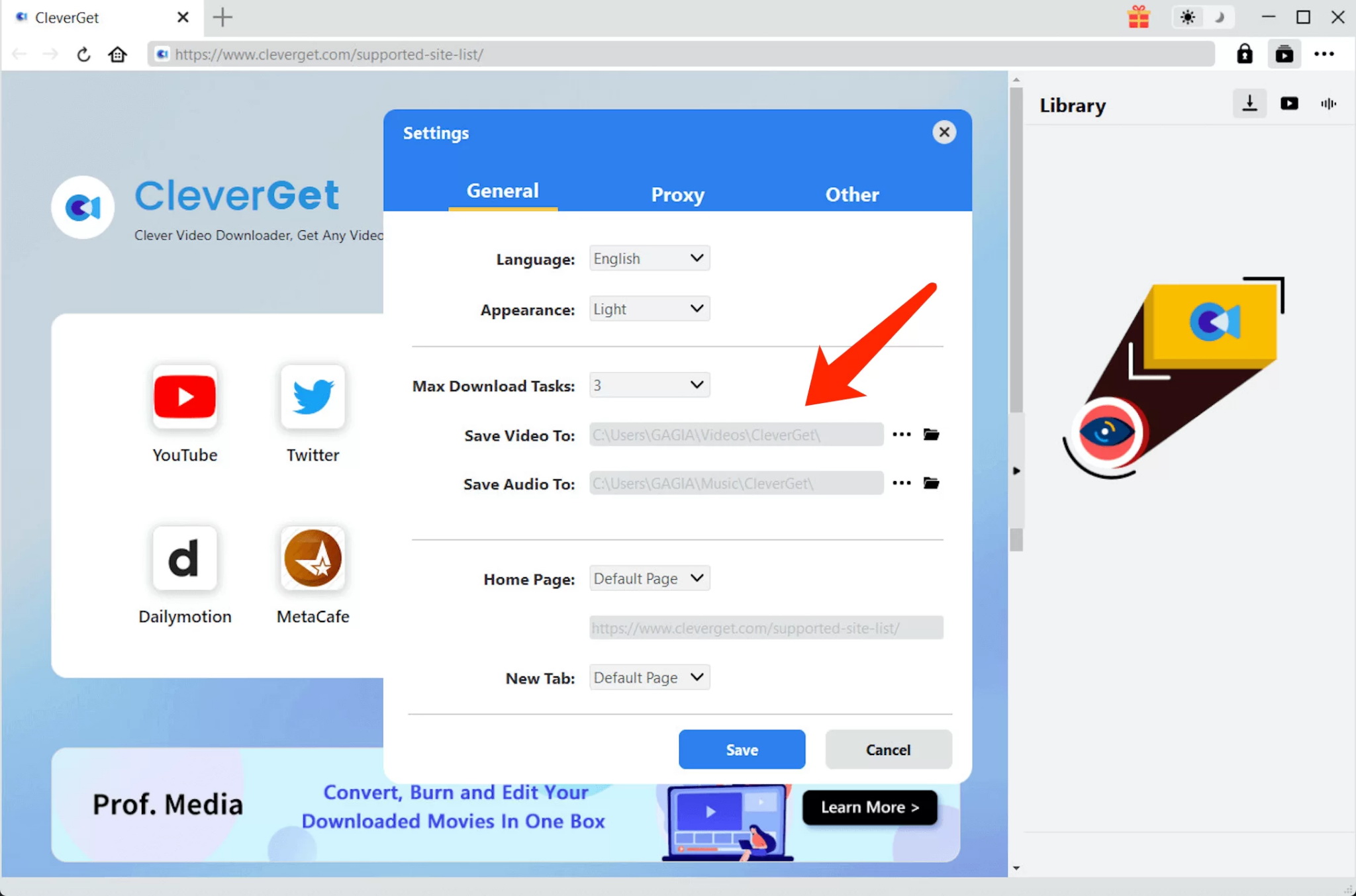
Step 1: Click on the Settings icon to open the settings panel and change the output folder.
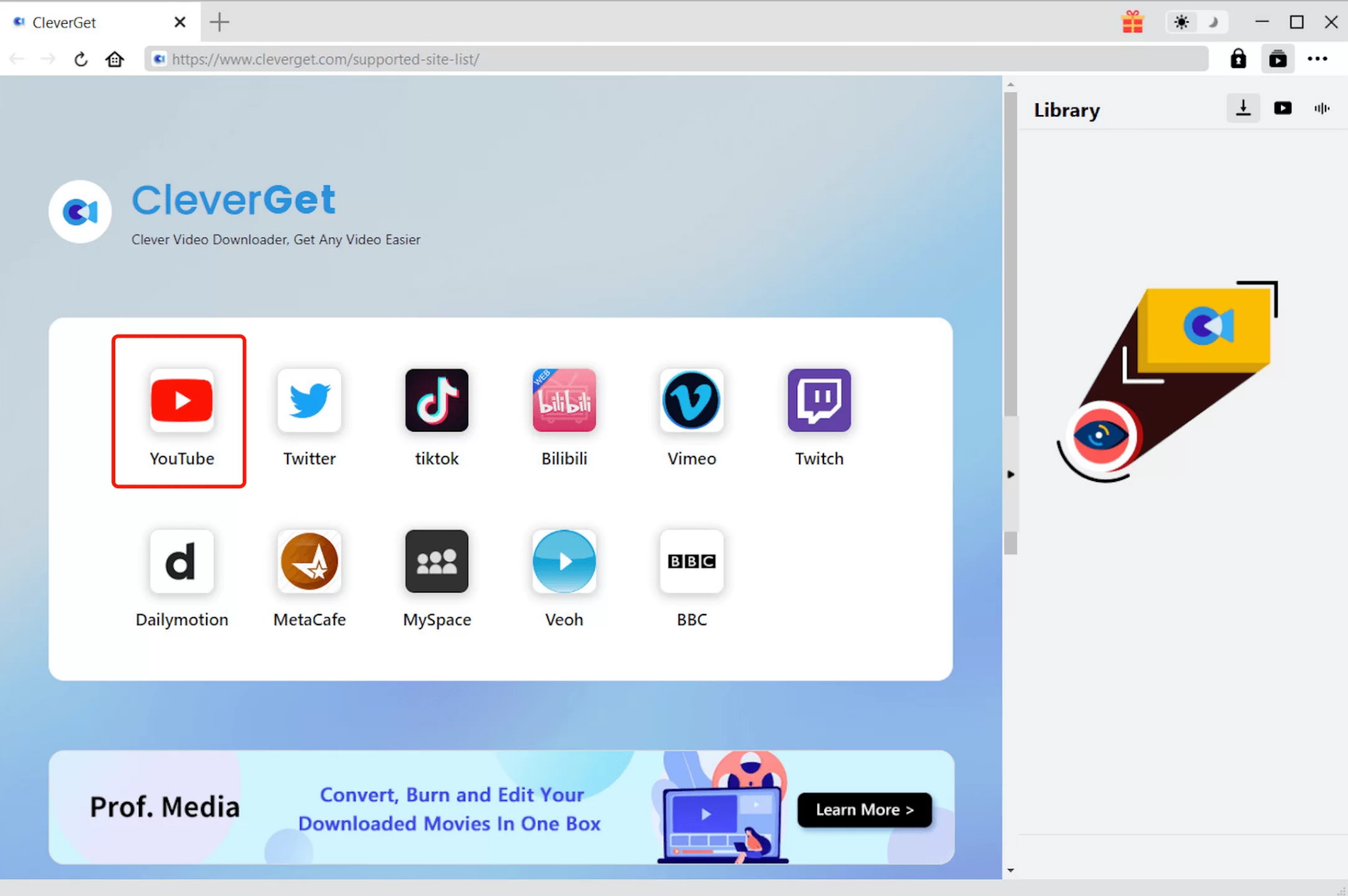
Step 2: Click the YouTube icon to go to YouTube. You can search for the video you want to download directly. Alternatively, you can copy & paste the video link to the address bar, and CleverGet will automatically identify the video.
Step 3: Next, you will need to click the download button. CleverGet will determine the video and provide you with several download options. Select your preferred size and quality. Click on the “Download” button to download YouTube videos.
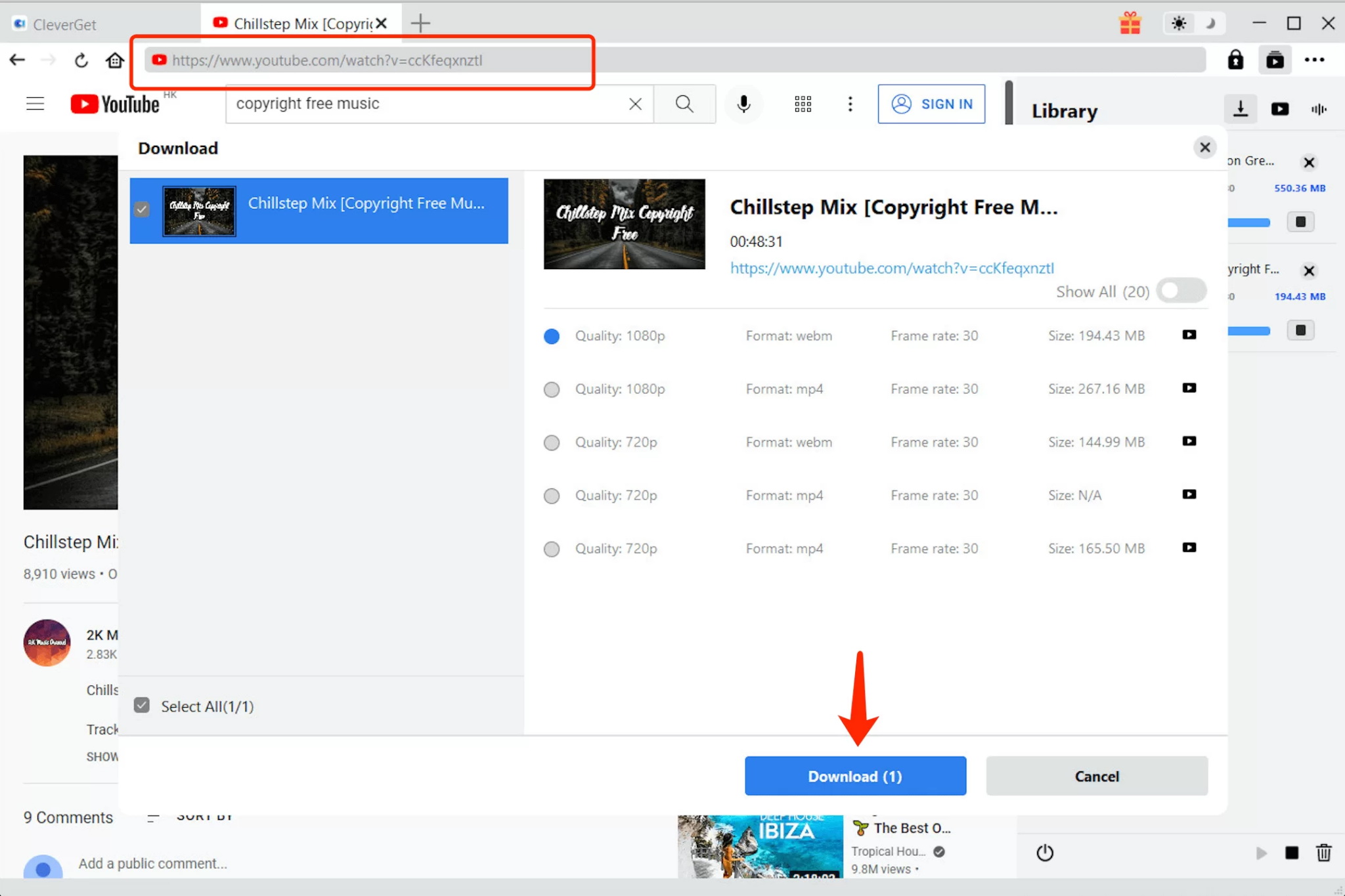
Now you can watch YouTube videos in offline mode in your preferred quality.
Disclaimer
We advise you to download content for personal use only. Users should follow their local laws and YouTube’s Terms of Service when downloading or watching online videos. Downloaded content is for individual and private viewing only, and should not be redistributed, used commercially, or for copyright infringement purposes.
5. FAQs
Is YouTube Smart Downloads still available in 2026?
Yes, the YouTube Smart Downloads feature is still there in YouTube Premium in 2026. However, this feature functionality can be different depending on the region and app updates.
Do I need YouTube Premium to use Smart Downloads?
Yes, Smart Downloads is available in YouTube Premium, and therefore requires a YouTube Premium subscription.
Which devices support Smart Downloads?
Smart Downloads primarily works on mobile devices with the YouTube app. This may depend on your device type and app version, also.
Can I choose which videos get downloaded?
No, Smart Downloads chooses videos from your watch history and recommendations, so you can’t select specific videos.
Why did my Smart Downloads disappear?
It can happen due to different settings, not enough storage, outdated apps, or even disabling Smart Downloads in an incorrect way.
6. Conclusion
YouTube Smart Download is best for viewing content offline. It automatically provides recommended videos for you. However, this feature isn’t suitable for all people as it can consume storage quickly. Sometimes it can install unwanted videos on your device. It’s better to disable Smart Downloads if you want total control over your downloads. This way, you can select exactly what to download. If you are looking for more advanced features, there are many tools to choose from, such as CleverGet Video Downloader. They provide greater control, batch downloads, and better quality than the YouTube Smart Download feature.
-

Most Popular Facebook Story Viewers Rank & BeyondPatrick Murray/2026-06-03
-

Is YouTube Smart Downloads Good or You Should Try Something Smarter?Patrick Murray/2026-06-03
-

How to Save Money on Discovery Plus SubscriptionSunny Wen/2026-05-28
-
ScreenRec Review: Is It Truly Free and Watermark-Free?Sunny Wen/2026-05-28
-

Can You Still Get a Free Trial on Discovery+?Sunny Wen/2026-05-20
-

Easy Guide: How to Burn Amazon Prime Videos to DVDs?Patrick Murray/2026-05-09
-
Where Are Amazon Prime Video Downloads Stored on PC/MobilePatrick Murray/2026-05-08
-

Sling TV or FuboTV: Which One Should You Pick?Sunny Wen/2026-05-11
-

Can You Share a Disney Plus Account with Different Households?Sunny Wen/2026-04-16
-

How to Use Loom Video Recorder for Quick Screen RecordingSunny Wen/2026-04-16
-

How to Download OnlyFans Videos from Messages?Patrick Murray/2024-05-09
-

[2026] What is OnlyFans Media not Loading Issue & How to Fix?Patrick Murray/2024-02-21
-

How to Download OnlyFans Videos on Android/iPhone/PC?Patrick Murray/2024-06-28
-

How to Download Private YouTube Videos Without AccessPatrick Murray/2025-02-12
-

How to Download YouTube Members-Only Videos?Cassie J./2024-05-08
-

Latest List of the Best Free Movie Websites[2026]Patrick Murray/2024-05-07
-

[2026 Update] How to Download All Media from OnlyFans?Patrick Murray/2024-02-26
-
TK2DL: Features and Uses of this TikTok & Twitter DownloaderLeia Liu/2024-09-05
-

10 Best HDHub4u Alternative Sites for Movie DownloadPatrick Murray/2024-03-06
-
How to Turn Off Age Restriction on YouTube?Patrick Murray/2024-03-04
 English
 Deutsch
 日本語
日本語 French
 한국인
한국인 Italiano