


 Try for Free
 Try for Free
Last updated on 2022-05-30, by
How to Download CNN Live Stream with Live Stream Downloader
“Can you download and watch CNN Live Streams offline? I want to download some CNN news live streams but have no idea how to do this. Please help.”
For those people who would like to download and watch CNN live streams offline, this guide would be help. Here we would like to show you how to download and watch CNN Live Streams free offline. Check the below content to learn the effective solutions to download CNN Live Stream with different Live Stream downloader tools on PC, Mac, mobile phones and tablets.
OUTLINECLOSE
Part 1: How to watch CNN live stream
CNN live streaming keep you in touch with the latest American and international headlines, breaking news, live news bulletins, latest CNN money stock market charts, entertainment updates, audio, video, weather & more.

You could watch CNN live streams on various players and devices, including PC, Mac computer, mobile phones, tablets, etc. CNN provides quite easy access for playing and watching CNN live streams. You could follow the below steps to learn how to watch CNN live streams in detail:
- Step 1. Visit CNNgo or click Watch Live TV on CNN.com for a free preview or select your TV service provider for unlimited livestreams.
- Step 2. Enter the username and password you use to access your TV service provider online account.
- Step 3. Watch live news coverage and your favorite shows on demand. At home or on the go!
The above are the general steps for playing and watching CNN live streams. If you are using a specific device, you could follow the below guide to learn how to play and watch CNN live streams on various devices:
- Step 1. Computer users: Watch on your computer using your browser. Just click to Watch Live TV or go to the TV or Video section and click CNNgo from the top menu.
- Step 2. iPad users: Get the CNN App for iPad. Tap go live at the top right of the Home Screen.
- Step 3. iPhone/Android users: Get the CNN app for iPhone and Android. Tap the TV icon at the top right of the Home Screen.
- Step 4. AppleTV users: Download CNNgo for tvOS in the App Store and then do just as your iPhone does to watch CNN live streams.
- Step 5. Roku: Add CNNgo to your Roku player and then do as you are using a CNNgo account to play and watch CNN live streams.
- Step 6. FireTV: Add CNNgo to your Fire TV.
- Step 7. Samsung TV: Check out CNNgo in the Recommended section of your Samsung TV.
- Step 8. Android TV: Download CNNgo from the Google Play store.
On different devices, you might need to complete different settings. But it’s not difficult for you to play and watch CNN live streams free.
Part 2: Best ways to download CNN live stream on PC/Mac
Let’s back to the topic: can you download CNN live streams on PC/Mac to watch CNN live streams free offline? Here we would like to recommend you 2 ways/tools to download CNN live streams on PC/Mac.
Solution 1: Use CleverGet
Specifically designed for downloading online videos, CleverGet Video Downloader could help you download online videos, including regular videos and Live Streaming, from various websites like YouTube, Facebook, Instagram, Twitter, TikTok, Veoh, VEVO, and 1000+ other video sharing sites. It could act as a professional CNN live stream downloader to help you download both regular videos and live streams from CNN.com. You could download online videos to MP4 or WEBM files. Actually, as one of the most comprehensive online video downloader tools, CleverGet could even act as paid video downloader to help you download videos from streaming services like Netflix, Amazon Prime video, HBO Max, Disney+, etc. with desired subtitles and audio tracks easily.
-
CleverGet Video Downloader
Download Movie Video With 320 Kbps audio.
Easily Download Live Streams Without Quality Loss.
Video Info Extractor.
Supports Playlist Downloading.
Support Multi-tasking & Video Info Extractor Inside.
Ease to Use UI.
The below guide would show you how to download and watch CNN live streams free on PC/Mac. Firstly, download and install CleverGet on your computer. It’s available in both Windows and Mac versions.
Step 1: Set download directory
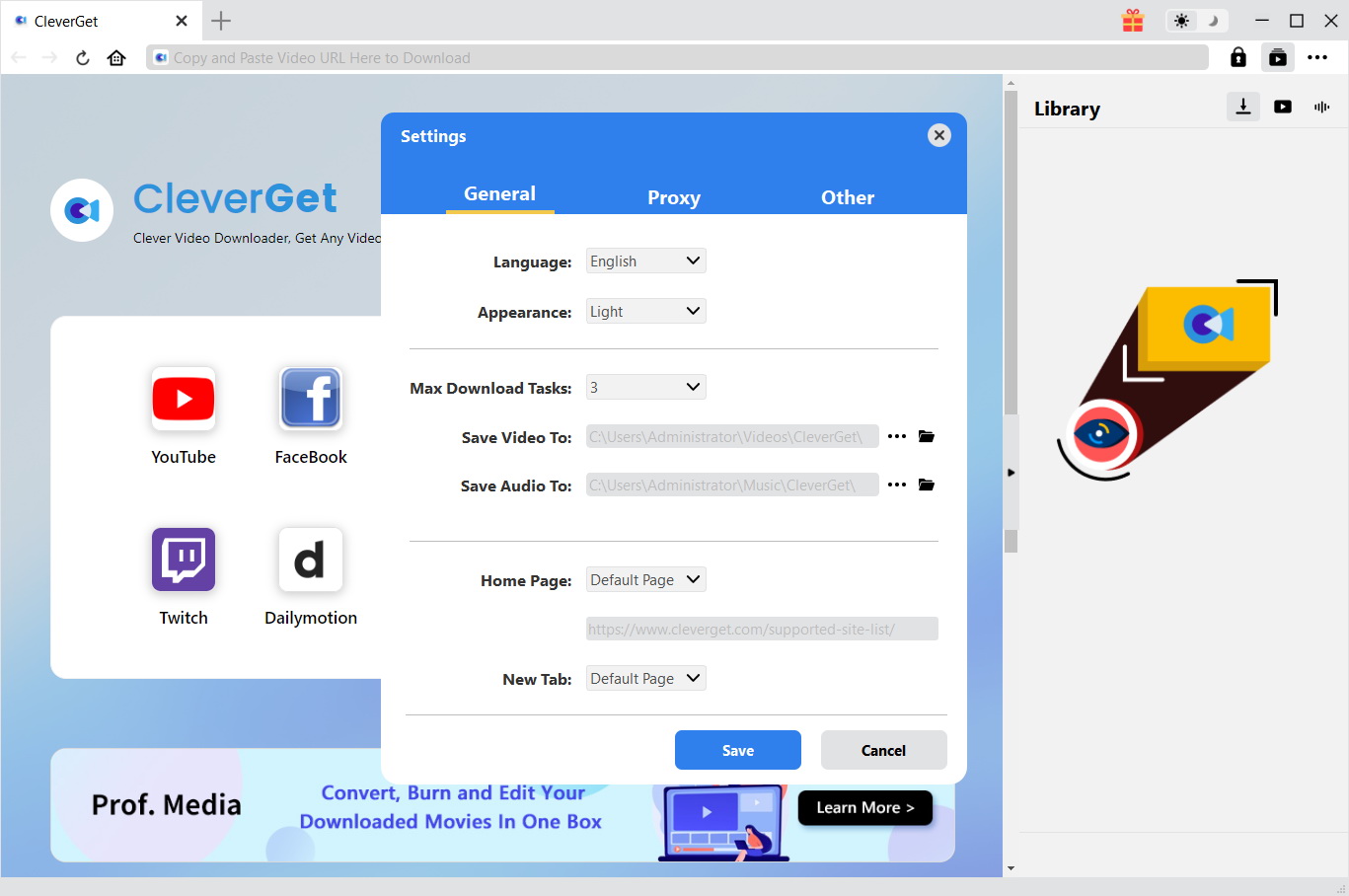
Kick off CleverGet and then click the 3-dot icon on the top right corner. Choose “Settings” option on the drop-down panel to set the download directory in the “Save Video To” box on the “Settings > General” tab.
Step 2: Open CNN live stream URL
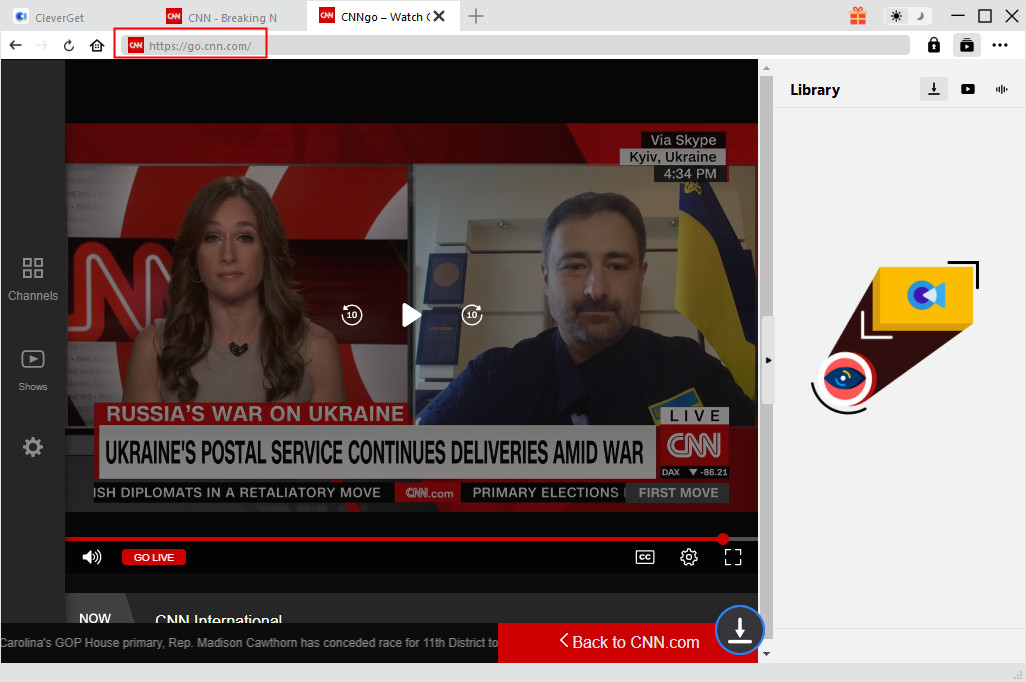
Copy and paste the URL of the CNN live stream page within CleverGet. Once you have entered the target video URL, CleverGet will automatically analyze it.
Step 3: Choose video option to download
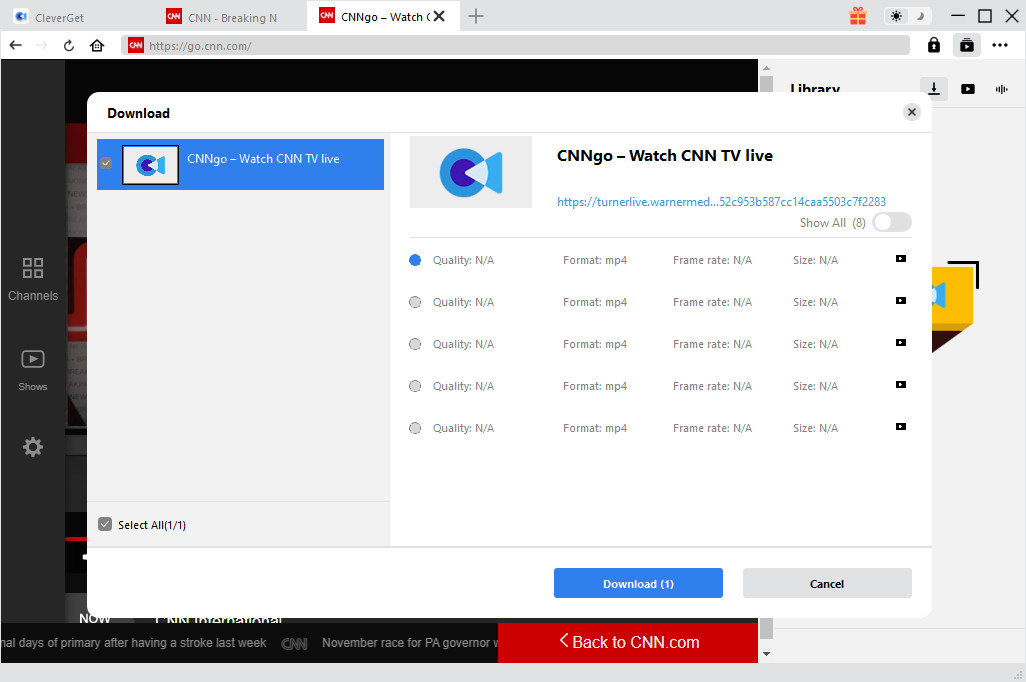
Once the analysis is over, there will pop out a “Download” interface that provides all available download options of the target video. Choose desired video option to download, and then click the “Download” button below. You could download multiple video files at once.
Step 4: Check downloading and downloaded Tumblr videos
Once you click the blue “Download” button, on the right, there will pop up a sidebar showing you the downloading progress. Check the downloading and downloaded CNN live stream videos here.
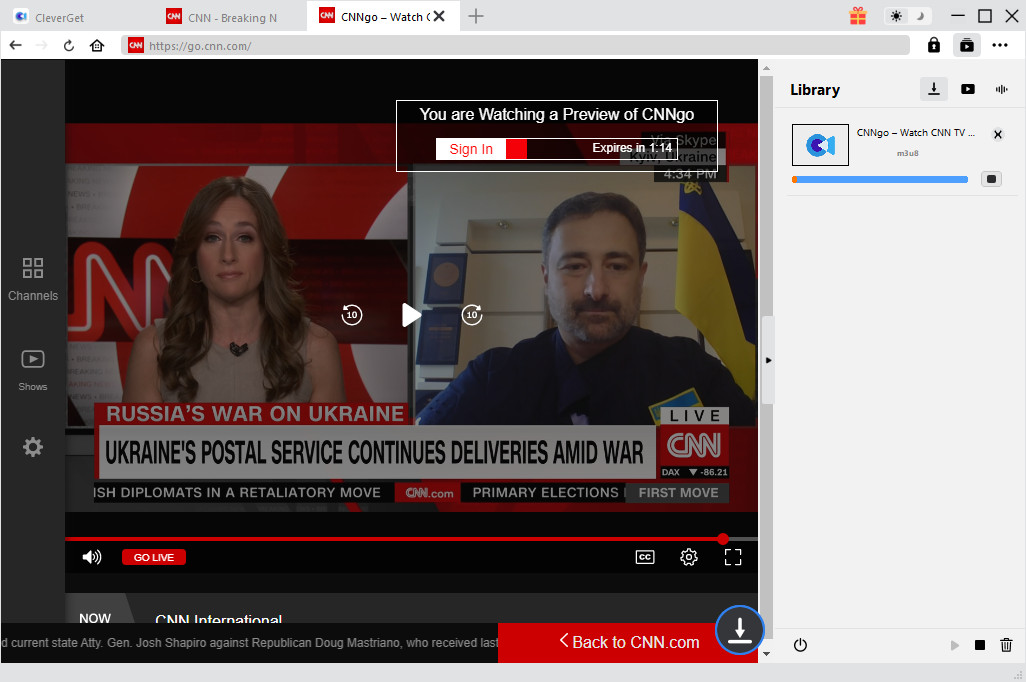
When the downloading completes, you could then freely play and watch CNN live streams free offline. This CNN live stream downloader helps you easily get CNN live streams offline.
Warm Prompt: CleverGet is used to download video only for personal use, please kindly obey the relevant DRM policy in the country or state where you live in.
Solution 2: Use Screen Recorder
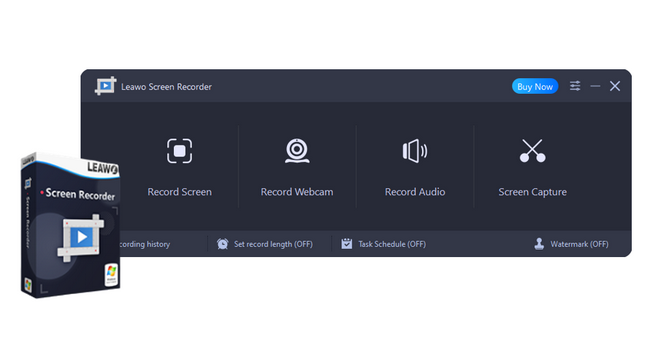
Besides live stream downloader tools, you could actually also use screen recorder software to record and download CNN live streams for free online watching. Leawo Screen Recorder is highly recommended due to its perfect performance and high quality recording.
-
Leawo Screen Recorder
– Record all activities on your computer screen as HD screencast.
– Record video from your webcam.
– Record any audio from your computer an/or microphone.
– Capture anything on your computer screen as screenshot.
– Add drawing, annotations, watermark, mouse animation, and BGM to recordings.
– Output in high quality with multiple formats selectable.
Leawo Screen Recorder is a multi-functional screen recorder software tool that could record any screen activity with audio. It includes screen capture, audio recorder, webcam recorder, etc. to help you record your screen or webcam with audio at ease. For downloading CNN live streams, Leawo Screen Recorder also works. The below guide would show you how to record CNN live streams with Leawo Screen Recorder in detail. Firstly, download Leawo Screen Recorder and install it on your computer.
Step 1: Set output Preferences
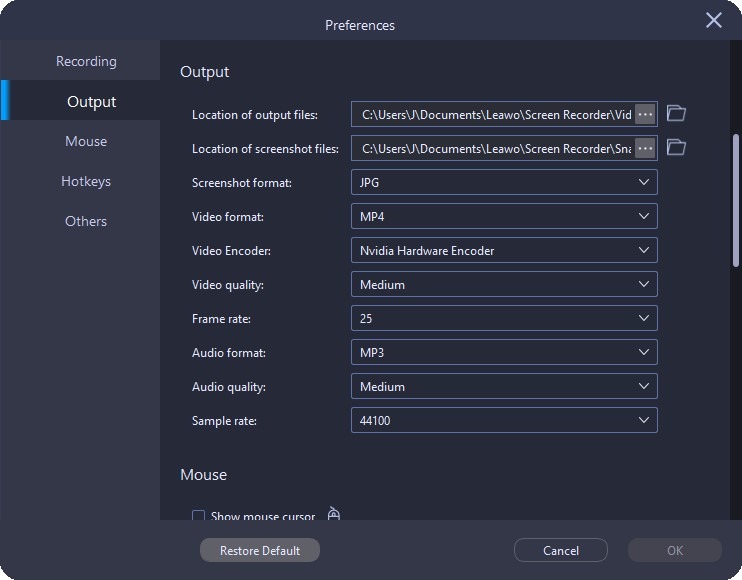
Kick off Leawo Screen Recorder and then click the three-bar icon on the top menu bar and choose “Settings” option in the drop-down menu. A “Preferences” panel will pop up. On the “Output” tab, you can set the output directory, video format, video encoder, video quality, video frame rate, audio quality, and audio sample rate before recording.
Step 2: Select recording region
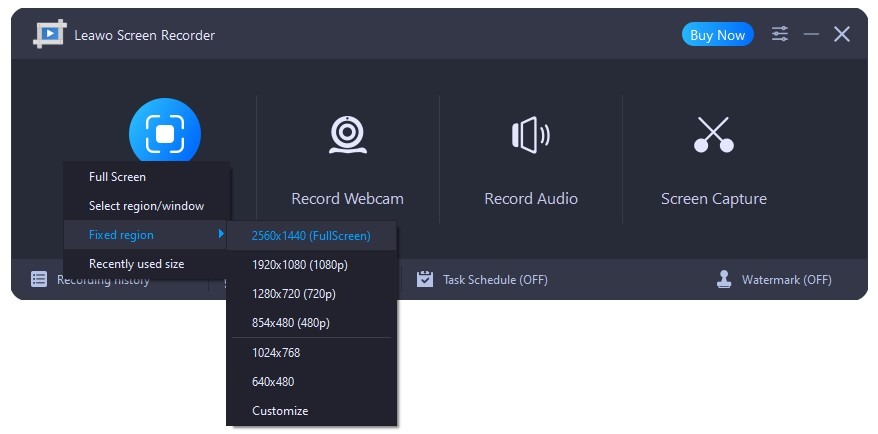
After setting output Preferences, return to the main interface of Leawo Screen Recorder. Once you click the “Record Screen” button on the main interface, a drop-down menu will pop up, where you can select recording region among Full Screen, Select region/window, Fixed region, or Recently used size. “Slect region/window” option is recommended here. Set the recording region as your CNN live stream screen occupies.
Step 3: Complete related recording configurations
On the follow-up window, you need to configure related settings before recording, including System Sound, Microphone, Webcam, recording length, recording task schedule, watermark, etc. Change these settings according to your needs.
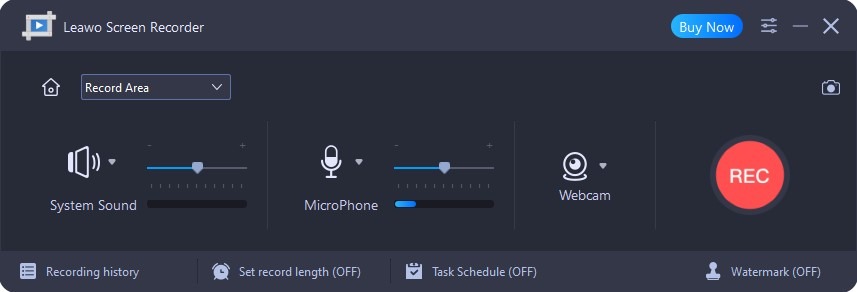
Step 4: Start recording CNN live streams
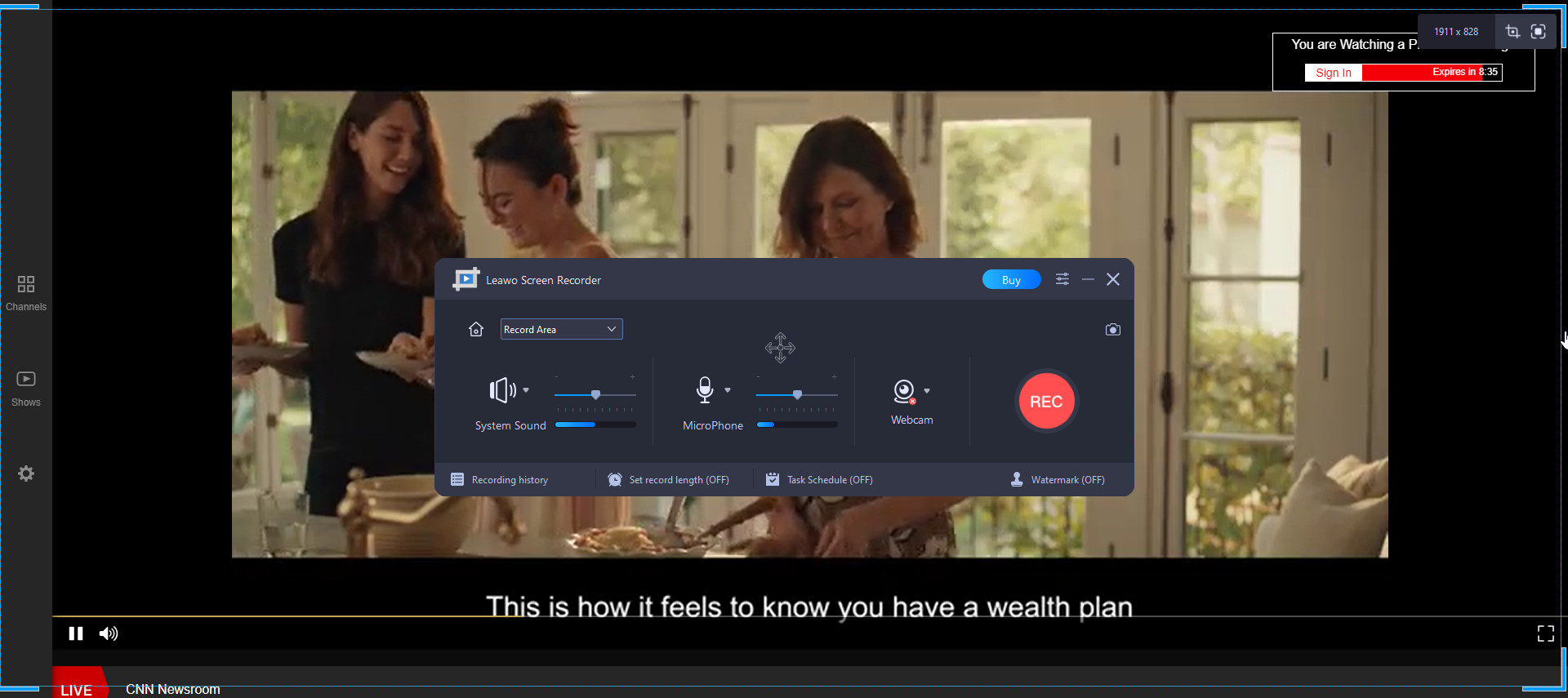
Now, open your CNN live stream page, and then click the red “REC” button on Leawo Screen Recorder to start recording. Click the Stop button any time point you want for stopping and saving recorded clips. In this way, you could easily record and download CNN live streams to watch CNN live streams offline free.
Part 3: Proven ways to download CNN live stream on mobile phone
What if you are using a mobile phone and would like to download CNN live streams, like an iPhone? If you want to download CNN live streaming videos on an Android/iPhone device, there are several apps available on the Play Store. All Video Downloader and Download Video Free are especially popular. You could get quite a few recommendations of live stream downloader apps for mobile phones to help you download CNN live stream son mobile phone. However, here we would like to recommend you the simplest but most effective solution – online live stream downloader.
Savefrom.net is a legitimate online service, which allows its users to download and convert videos from various websites and social media networks. Follow the below steps to learn how to download CNN live stream videos.
- Step 1. Copy the link to the video you want to download.
- Step 2. Open the browser on your Android device and visit SaveFrom.
- Step 3. Paste the link and tap the arrow next to it.
- Step 4. Choose the preferred quality and tap Download.
Part 4: Tested ways to download CNN live stream on tablet
If you are using a tablet, we would like to recommend you VidMate to download CNN live streams on tablets. VidMate is a free video downloader app that also serves as a media converter and player. Three multimedia platforms in one Android app, VidMate is an essential tool for collecting and watching videos in HD format. VidMate can be found on the Google Play Store for Android build 4.2.1 or higher, as well as Windows 7 and iOS 12.1.2.

Follow the below steps to learn how to play, watch and download CNN live stream videos with VidMate:
The download will start automatically and you will see the downloading area.
-
How to Screenshot on Windows 10/11: Tools & ShortcutsSunny Wen/2026-03-30
-

Does Paramount Plus Have Live TV? Full GuideSunny Wen/2026-03-30
-

How to Download Videos from 9Now?Cassie J./2026-03-24
-

How to Disable YouTube Shorts: Simple Methods That WorkSunny Wen/2026-03-23
-

Hulu Screen Limits: How Many People Can Watch Hulu at Once?Cassie J./2026-03-24
-

From Flight to Hotel: How to Watch Netflix While TravelingCassie J./2026-03-24
-

How to Record on Canva: Step-by-Step Guide for BeginnersSunny Wen/2026-03-16
-

Paramount Plus Error Code 111: Causes, FixesLeia Liu/2026-03-13
-

4K Video Downloader Review: Is It Worth Using?Leia Liu/2026-03-13
-

ScreenPal Review: Is It the Right Screen Recorder for You?Sunny Wen/2026-03-12
-

How to Download OnlyFans Videos from Messages?Patrick Murray/2024-05-09
-

[2026] What is OnlyFans Media not Loading Issue & How to Fix?Patrick Murray/2024-02-21
-

How to Download OnlyFans Videos on Android/iPhone/PC?Patrick Murray/2024-06-28
-

How to Download Private YouTube Videos Without AccessPatrick Murray/2025-02-12
-

How to Download YouTube Members-Only Videos?Cassie J./2024-05-08
-

Latest List of the Best Free Movie Websites[2026]Patrick Murray/2024-05-07
-

[2026 Update] How to Download All Media from OnlyFans?Patrick Murray/2024-02-26
-

TK2DL: Features and Uses of this TikTok & Twitter DownloaderLeia Liu/2024-09-05
-

10 Best HDHub4u Alternative Sites for Movie DownloadPatrick Murray/2024-03-06
-

How to Turn Off Age Restriction on YouTube?Patrick Murray/2024-03-04
 English
 Deutsch
 日本語
日本語 French
 한국인
한국인 Italiano