


 Try for Free
 Try for Free
Last updated on 2022-06-07, by
Download Instagram Reels – How to Download Reels from Instagram
With the fast development of online multimedia entertainment, many social networks have created special video parts for their users to share, watch and review videos freely. [icon name=”instagram” prefix=”fab”] Instagram Reels is one of the most popular methods. If you are wondering how to download Instagram Reels, this guide would be exactly for you. We will show you what Instagram Reels are and how to download Reels from Instagram with the best Instagram video downloader tool.
OUTLINECLOSE
Part 1: What are Instagram Reels?
So, what are Instagram Reels? According to Instagram officials, Reels are short, entertaining videos on Instagram where you can express your creativity and bring your brand to life.
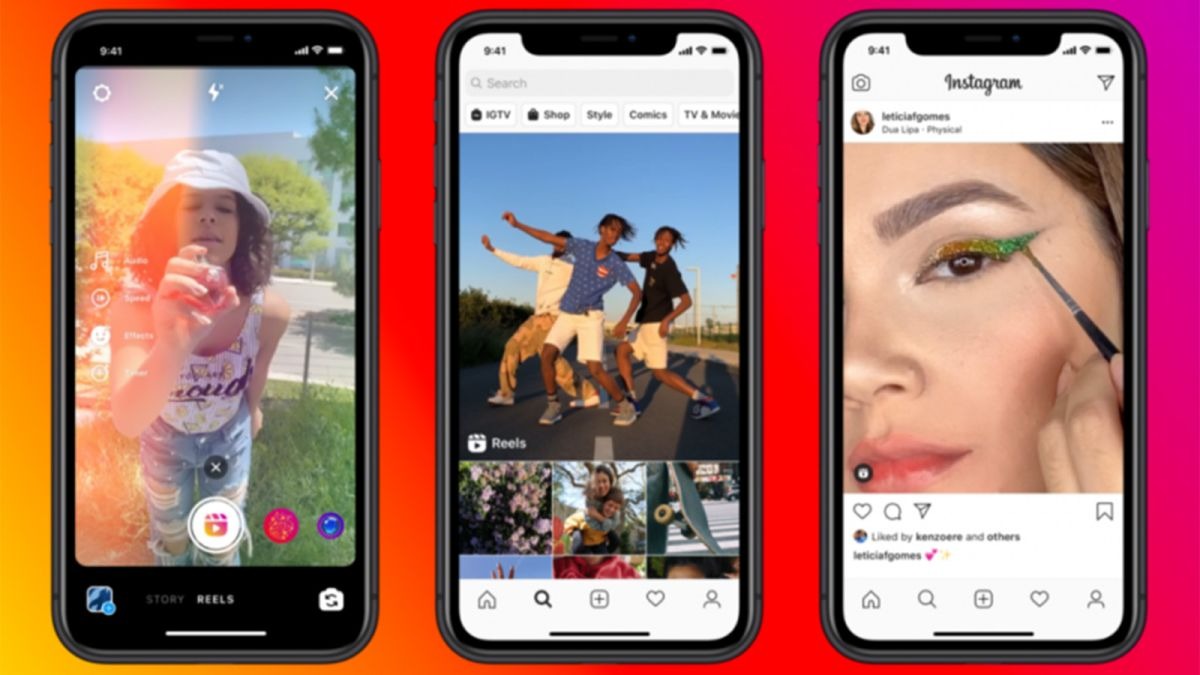
Reels invites you to create fun videos to share with your friends or anyone on Instagram. Record and edit 15-second multi-clip videos with audio, effects, and new creative tools. You can share reels with your followers on Feed, and, if you have a public account, make them available to the wider Instagram community through a new space in Explore. Reels in Explore offers anyone the chance to become a creator on Instagram and reach new audiences on a global stage.
Since their inception, Instagram Reels have been an amazing way for brands and businesses to flex their creative muscles and add a visual experience beyond a grid post.
And what makes Reels different is that instead of user’s only seeing Reels from accounts they follow, users see Reels from all Instagram accounts on the Reels tab.
Part 2: How to make a reel on Instagram
How can you crate a reel on Instagram? Is it complicated to make a reel on Instagram? With your Android or iPhone mobile phones, it wouldn’t be any difficult for you to make a reel on Instagram. You could just follow the below steps to learn how to make a reel on Instagram.
Step 1:Open the Instagram mobile app on your Android or iOS device. Tap Your story from the home screen or swipe in from the left to open the Instagram camera. From the options at the bottom, press Reel.
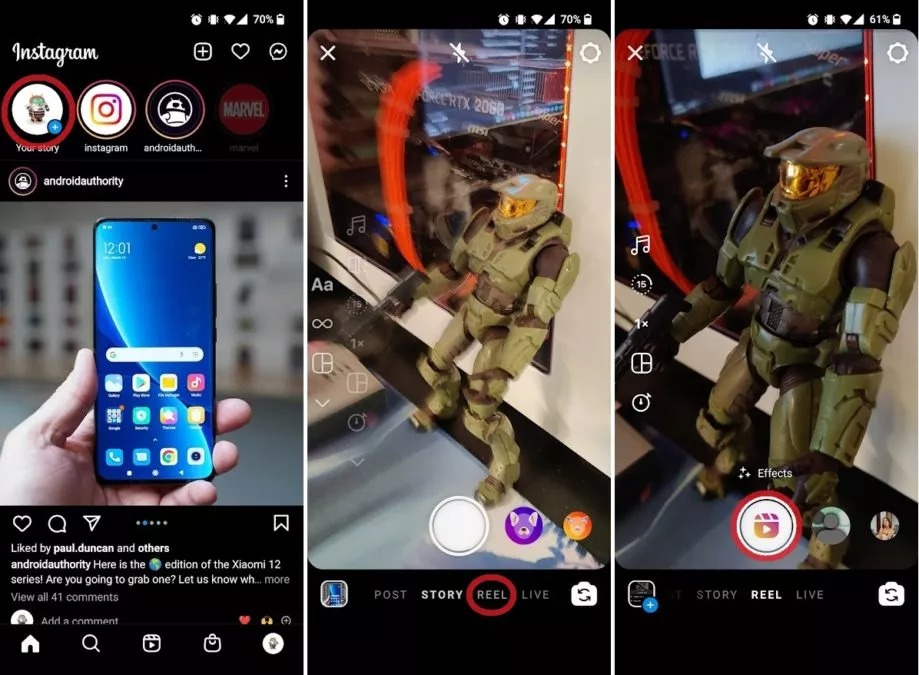
Step 2: Press the capture button in the middle to record your Reel. If you want to add any effects or music, you can do so here or in the editing process afterward.
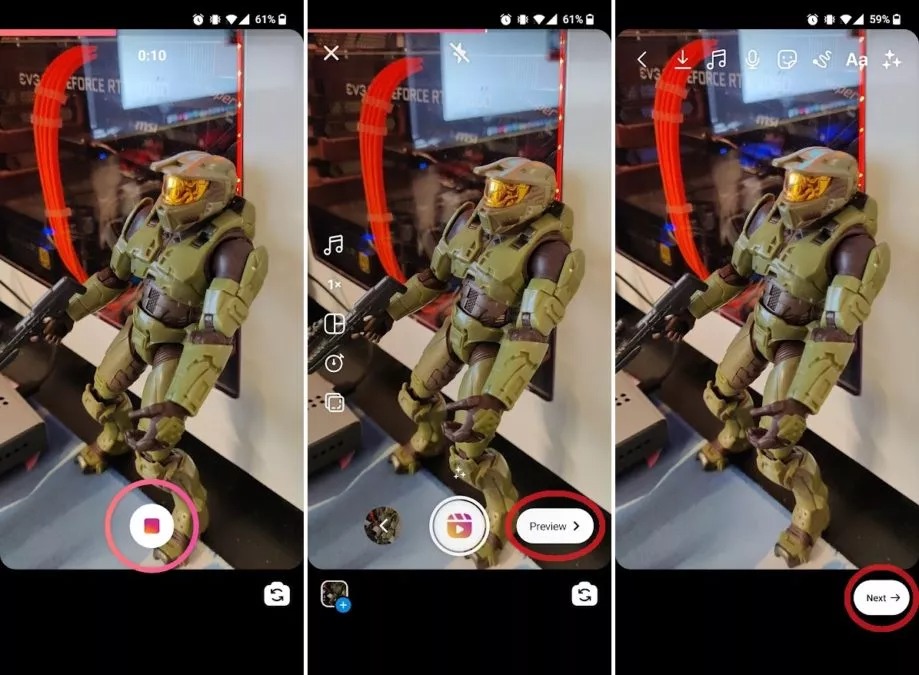
Step 3: If you want to, go ahead and add music and effects to your Reel, then press Preview. This will allow you to watch a preview of your short video and add any final changes before you go ahead and post it. When ready, tap Next.
Step 4: Add a caption, profile image, and tags. If you have music and wish to rename the audio, you can do so here as well.
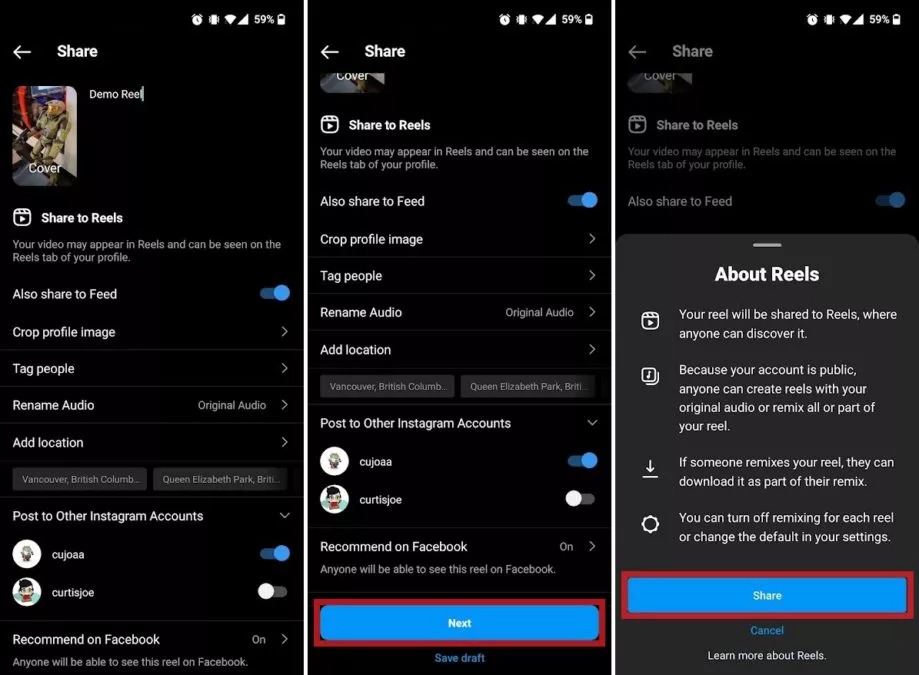
Step 5: Scroll down and press Next. Press the blue Share button in the following pop-up to post your Reel. Once posted, your Reel will be viewable by all other users from the Reels tab at the bottom of the app.
By following the above steps, you could easily create and make a reel on Instagram for sharing with your followers. It’s quite simple. It should be noted that if you are wondering how long can Instagram reels be, the length is 15 seconds.
Part 3: Best Instagram video downloader to download Instagram reels
Can I download Instagram reels? What is the best Instagram Reels download software tool to download Instagram reels? Well, let’s answer these questions first. Of course you could download Instagram Reels. It’s quite easy to download Instagram Reels of your own, and would be a little bit complicated for downloading Instagram Reels from someone else. But with the right Instagram Reels download software tool, it would be much easier. Here we would like to recommend you the best Instagram video downloader and detailed guide on how to donwload Instagram Reels.
CleverGet Video Downloader is the best Instagram video downloader to help you download Instagram Reels. Professionally designed for online video downloading, CleverGet Video Downloader could help you download videos from YouTube, Veoh, VEVO, Dailymotion, MySpace, and 1000+ other video sharing sites. As for the social network medias, CleverGet could also act as Twitter video downloader, Facebook video downloader, TikTok video downloader, Instagram video downloader and more to download videos from these popular social medias. It could automatically detect and analyze Instagram Reel videos to provide people multiple download options in various quality, formats, frame rate, and size. What’s more, it could even download live videos like Instagram Live videos, YouTube Live videos, Twitch Live videos, etc. This Instagram video downloader could detect, analyze and then download Instagram videos fast.
Free download and install CleverGet Video Downloader on your computer. Then follow the below guide to learn how to download Instagram Reels videos on your computer on Windows/Mac computer at will.
-
CleverGet Video Downloader
Download Movie Video With 320 Kbps audio.
Easily Download Live Streams Without Quality Loss.
Video Info Extractor.
Supports Playlist Downloading.
Support Multi-tasking & Video Info Extractor Inside.
Ease to Use UI.
Note: CleverGet Video Downloader is a module built in CleverGet.
Step 1: Set download directory
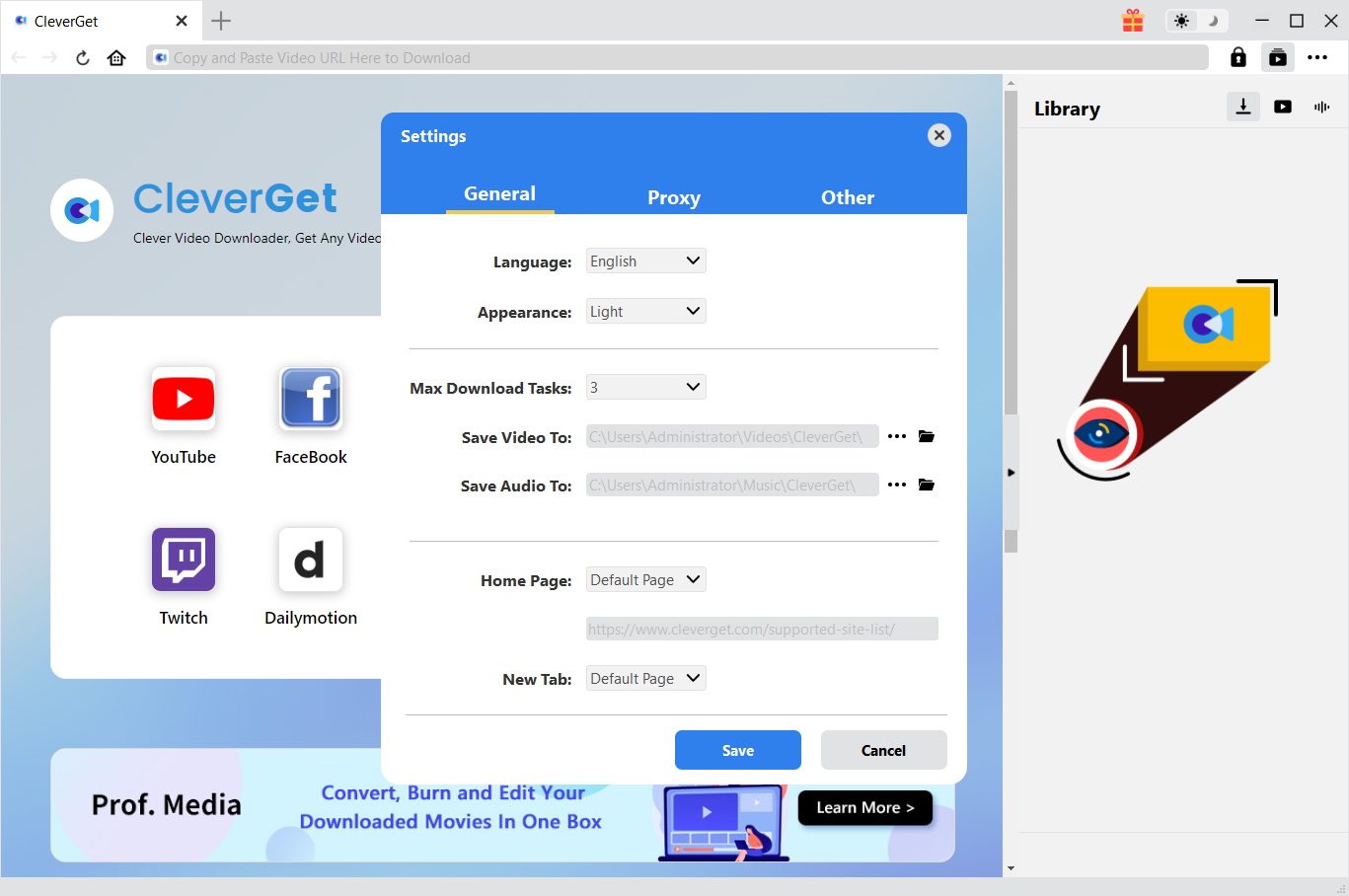
Kick off CleverGet after you have successfully installed it on your computer. It has default download directory for saving downloaded online videos, but allows you to change it. To change the directory, on CleverGet, click the 3-dot icon and then choose “Settings” option on the drop-down panel. On the pop-up “Settings” window, set download directory in the “Save Video To” box on the “Settings > General” tab.
Step 2: Input Instagram Reels video URL
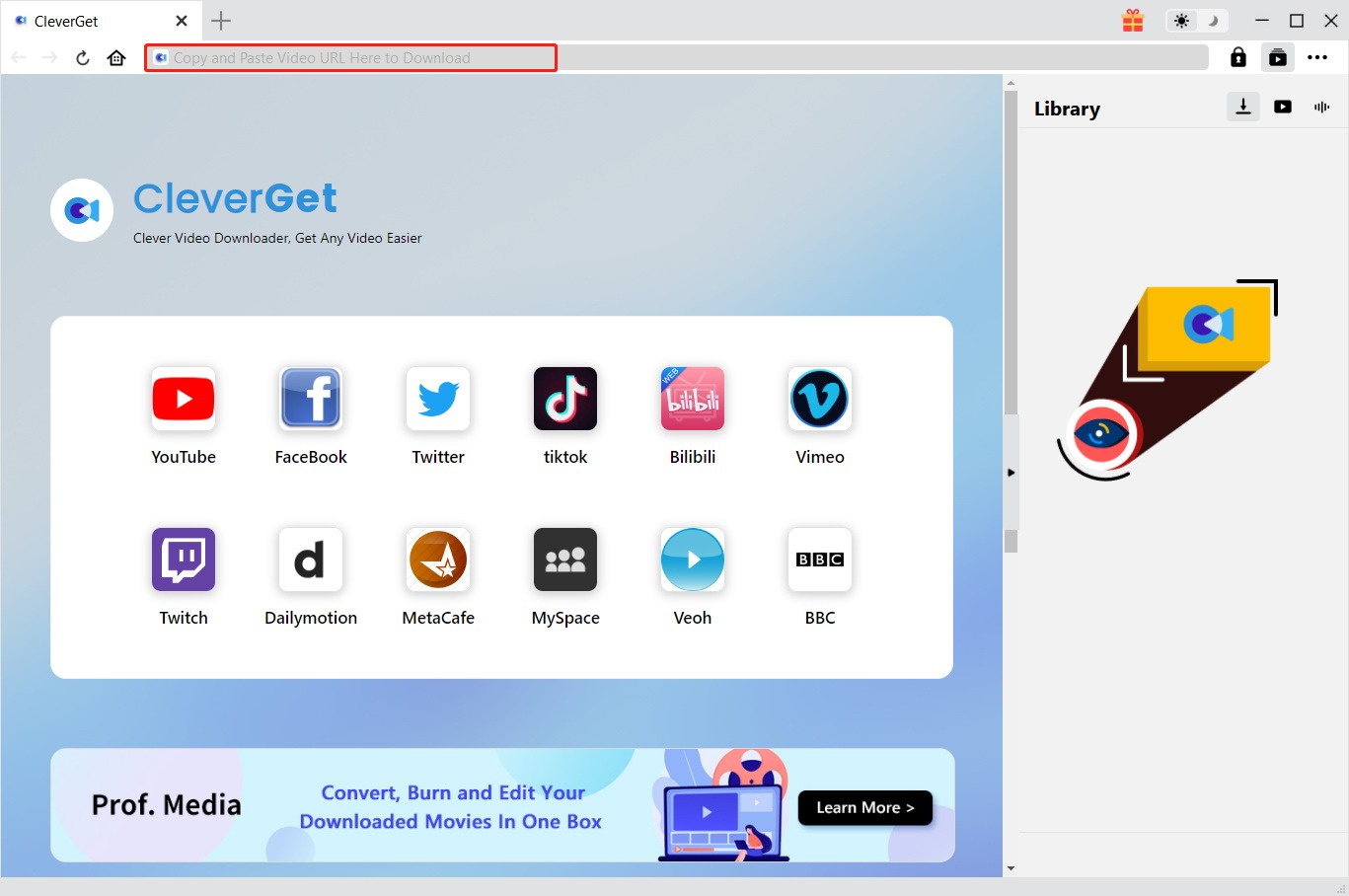
Copy and paste the Instagram Reels video URL into the address bar. Once you have entered the video URL, CleverGet will provide you the login options as Instagram requires. Log in with your Instagram account and password. After login completes, CleverGet will automatically analyze the video URL. Make sure you have entered a movie URL that could play back the target movie.
Step 3: Choose Instagram Reels video to download
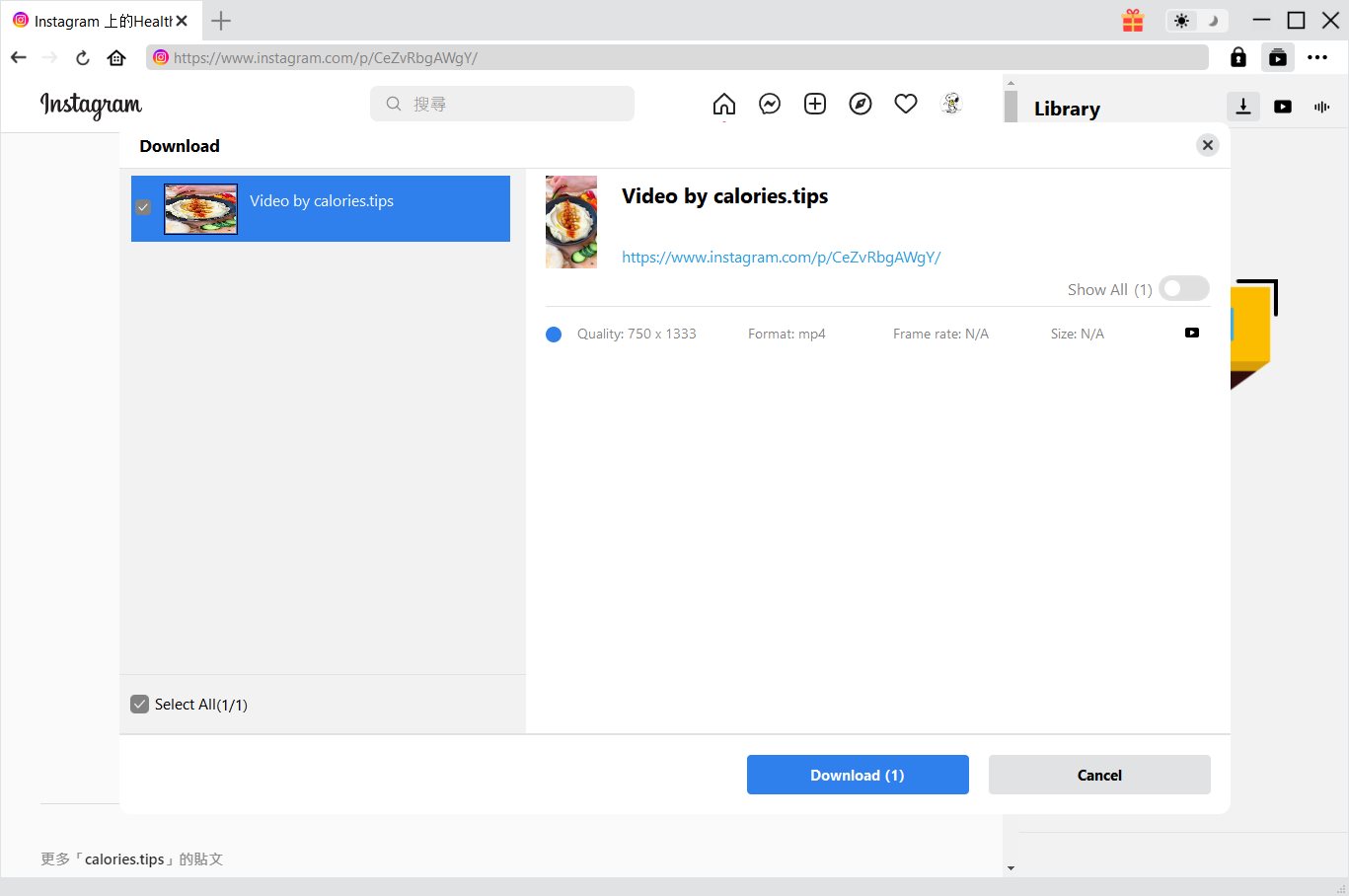
Once the analysis is over, there will pop out a “Download” interface that provides all available download options in different resolutions, formats, frame rates and sizes. By default, CleverGet chooses the best option for you to download, but it allows manual change and multiple choices. Once you have chosen which video option(s) to download, click the blue “Download” button to start downloading Instagram Reels videos.
Step 4: Check downloading Instagram Reels videos
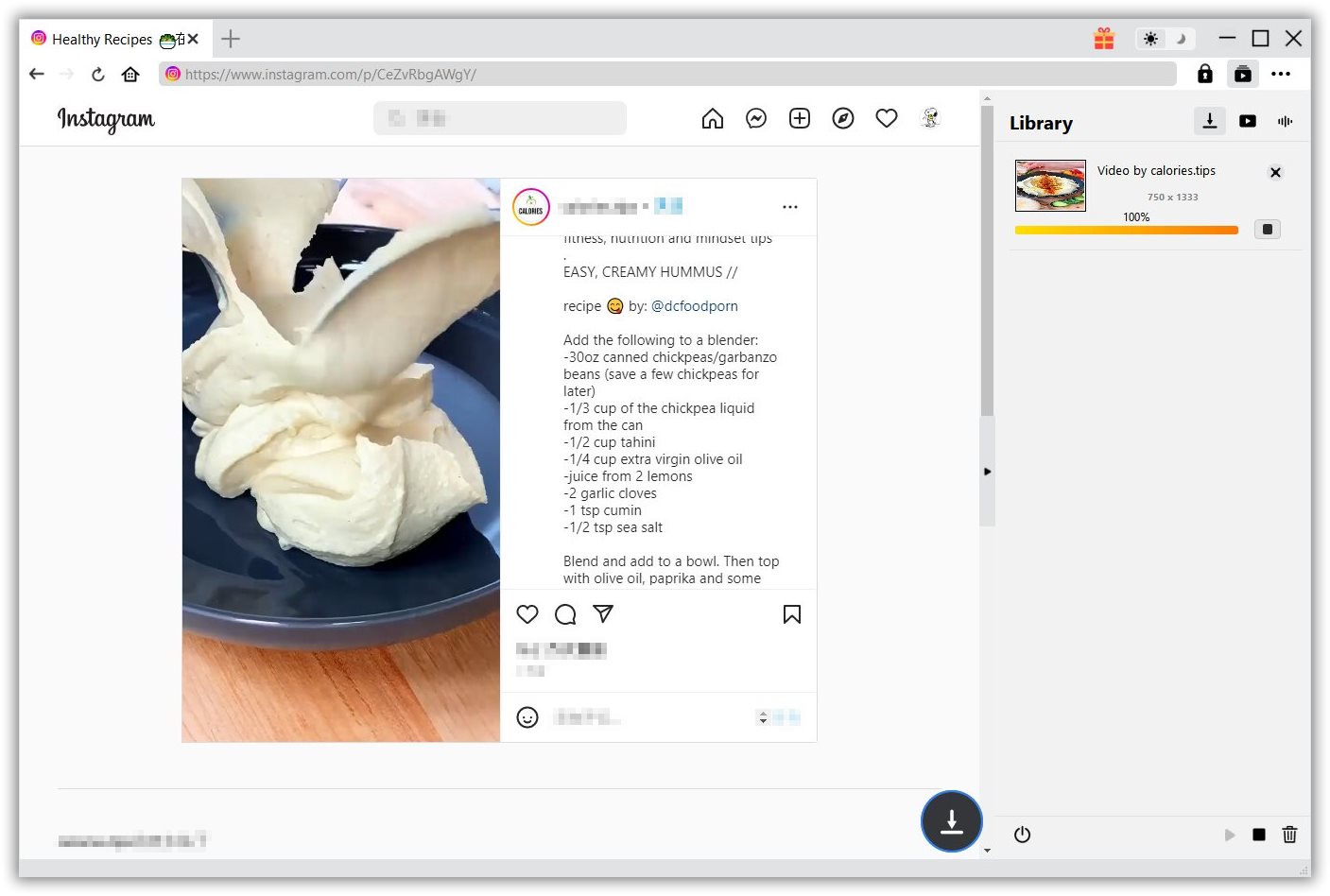
Once you click the “Download” button, on the right, there will pop up a sidebar showing you the downloading progress. You could stop/resume, stop or cancel any download options at your will.
Step 5: Check downloaded Instagram Reels video
Once the downloading completes, the downloaded Instagram Reels videos will display automatically under the “Video” library on the right sidebar. You could then freely click to manage downloaded Instagram Reels videos like playing back, deleting, showing video URL, etc.
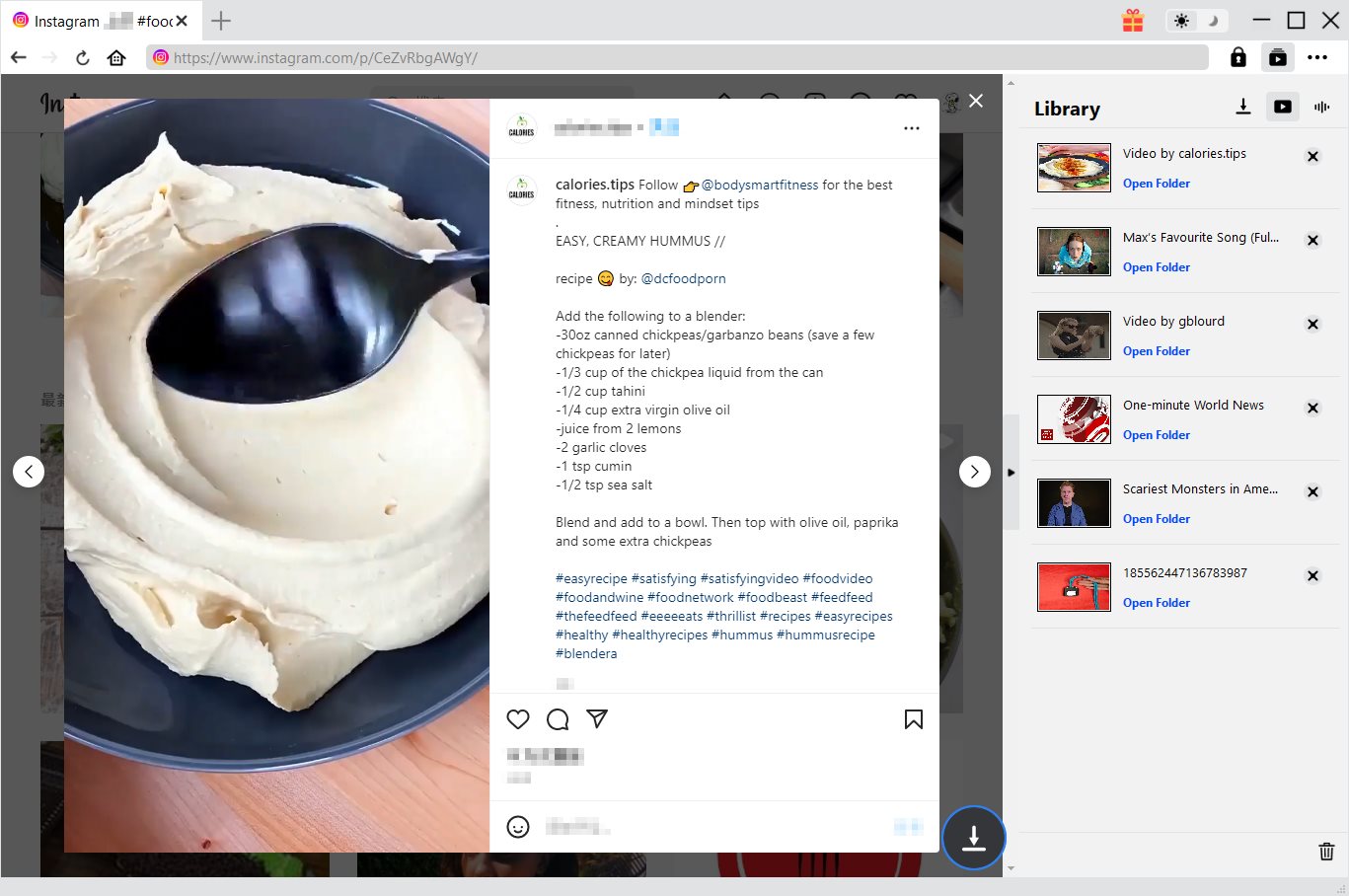
In this way, no matter you are going to download Instagram Reels videos of your own or anyone else, you could easily complete the Instagram Reels download tasks on your computer. You could download as many Reels as you like witht CleverGet Video Downloader.
Part 4: Further reading – FAQs about Instagram Reels
Regarding Instagram Reels, we have prepared some more FAQs for you to better understand what Instagram Reels are and how it works.
-
- 1. How long can Instagram Reels be?
- Reels are typically short videos that last around 15 seconds long. However, they can extend up to a maximum of 60 seconds in length.
-
- 2. Can you post Reels from your desktop PC?
- Unfortunately not. Reels are a feature currently exclusive to the mobile version of the app.
-
- 3.How to download Instagram Reels of your own without 3rd-party software tool?
- Open Instagram, go to your account, and navigate to the Reels tab. Find the Reel you want to save, then tap on it to open the video up in full-screen mode. Hit the three dots in the bottom right corner to pull up the menu. Hit Save to Camera Roll. The video will automatically save to your device.
-
- 4. Can I add a voiceover to my reel on Instagram?
- Yes, you can. Before you share your reel, you can add a voiceover. After recording your reel, you could tap the more option to call out the audio icon, then hold the red icon to record audio over the video. Tap Done to finish adding voiceover.
-
- 5. How do I remix a video on Instagram?
- Remix lets anyone create a reel that includes all or part of your video that they can download as part of their remix. To remix a reel, click the … (on iPhone) or the triangle 3-dot icon (on Android) at the bottom of the reel, and then tap “Remix This Reel” option.
-
- 6. Who can create a remix of my videos on Instagram?
- If your account is for private, no one can remix your reels. If your account is for public, anyone on Instagram can remix your reels shared after reming becomes available.
-

How to Screenshot on Windows 10/11: Tools & ShortcutsSunny Wen/2026-03-30
-

Does Paramount Plus Have Live TV? Full GuideSunny Wen/2026-03-30
-

How to Download Videos from 9Now?Cassie J./2026-03-24
-

How to Disable YouTube Shorts: Simple Methods That WorkSunny Wen/2026-03-23
-

Hulu Screen Limits: How Many People Can Watch Hulu at Once?Cassie J./2026-03-24
-

From Flight to Hotel: How to Watch Netflix While TravelingCassie J./2026-03-24
-

How to Record on Canva: Step-by-Step Guide for BeginnersSunny Wen/2026-03-16
-

Paramount Plus Error Code 111: Causes, FixesLeia Liu/2026-03-13
-

4K Video Downloader Review: Is It Worth Using?Leia Liu/2026-03-13
-

ScreenPal Review: Is It the Right Screen Recorder for You?Sunny Wen/2026-03-12
-

How to Download OnlyFans Videos from Messages?Patrick Murray/2024-05-09
-

[2026] What is OnlyFans Media not Loading Issue & How to Fix?Patrick Murray/2024-02-21
-

How to Download OnlyFans Videos on Android/iPhone/PC?Patrick Murray/2024-06-28
-

How to Download Private YouTube Videos Without AccessPatrick Murray/2025-02-12
-

How to Download YouTube Members-Only Videos?Cassie J./2024-05-08
-

Latest List of the Best Free Movie Websites[2026]Patrick Murray/2024-05-07
-

[2026 Update] How to Download All Media from OnlyFans?Patrick Murray/2024-02-26
-
TK2DL: Features and Uses of this TikTok & Twitter DownloaderLeia Liu/2024-09-05
-

10 Best HDHub4u Alternative Sites for Movie DownloadPatrick Murray/2024-03-06
-
How to Turn Off Age Restriction on YouTube?Patrick Murray/2024-03-04
 English
 Deutsch
 日本語
日本語 French
 한국인
한국인 Italiano