


 Try for Free
 Try for Free
Share article:


What Is IGTV and How to Use It

2026-01-05 ・ Related to: CleverGet Recorder
52 Views
Summary:
This article is to help readers have a deeper understanding of IGTV. And create higher-quality videos to meet various needs.
MenuCLOSE
Instagram has attracted users of different ages around the world. To offer users higher-quality experience, it launched IGTV. This is designed for people who use mobile devices more often. And what makes it different from regular posts is that it allows users to post videos up to 60 minutes. This article will take you through this feature and compare its pros and cons.
Part 1: What is IGTV?
IGTV can be regarded as a combination of short videos and long videos. In this section, users can post long videos within 60 minutes. Therefore, users can post content that needs more time to show and explain, and those who’re interested in long videos can find a way to entertain. In social media, captivating content is the core value, so IGTV is worth understanding and exploring.
Part 2: How to Use IGTV?
1. IGTV Requirements
Before uploading your IGTV video, please get to know the relevant rules to ensure a smooth uploading process.
- Regular accounts can upload videos from 15 seconds to 10 minutes; certified accounts can upload videos up to 60 minutes.
- The video format to be posted has to be MP4.
- Videos’ minimum aspect ratio is 4:5 and the maximum is 9:16. Horizontal videos can be viewed in full screen and the phone needs to be flipped.
- The maximum file size for videos within 10 minutes is 650MB; for videos within 60 minutes, it can reach up to 5.4GB.
- All video content must follow Instagram’s community guidelines. Videos that violate these guidelines may be removed by the platform.
2. How to Upload Your IGTV Videos
After meeting the above requirements, users can upload IGTV videos through the Instagram app or the official Instagram website on their computers. The following are steps on how to upload your IGTV videos:
On PC
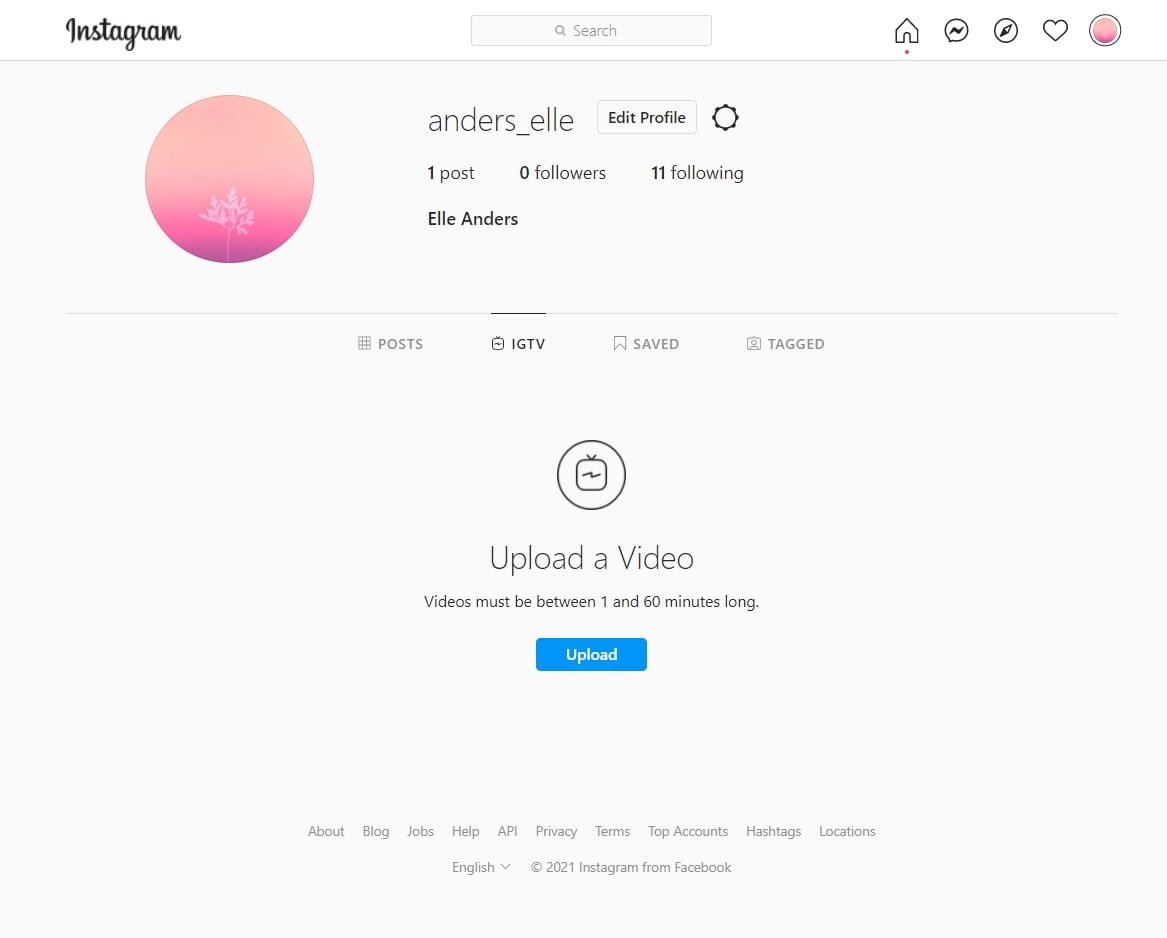
Step 1: Visit the official Instagram website in your browser. Click on the “IGTV” at the bottom of your personal profile page your profile information. Then, click the “Upload”.
Step 2: Select the video you want to upload. The system will generate a cover image for you. You can also choose the cover photo and fill in the video title and description as you want.
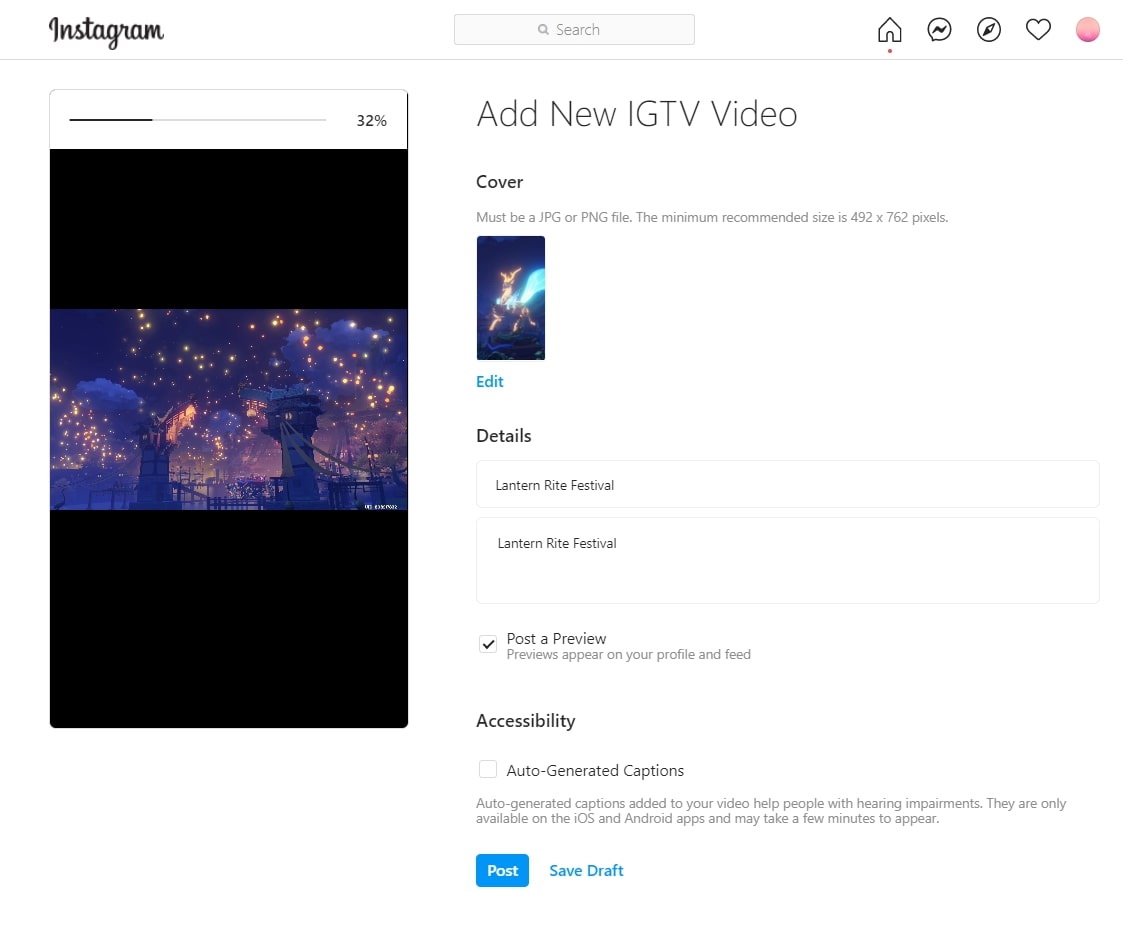
Step 3: Click “Post” and the video will be published within a few minutes. If you want to publish it later, you can click “Save Draft”, and the video will be saved in draft mode until you decide to publish it.
On Mobile
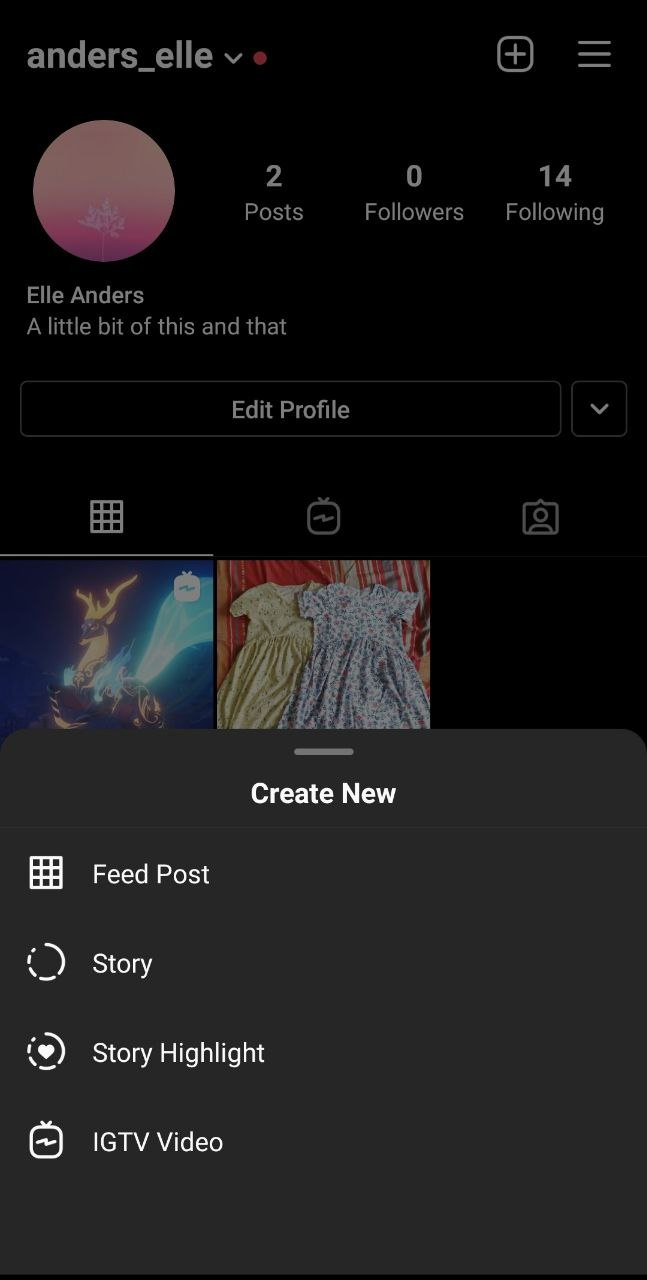
Step 1: Open Instagram app, click on “+” at the top right corner and select “IGTV Video”.
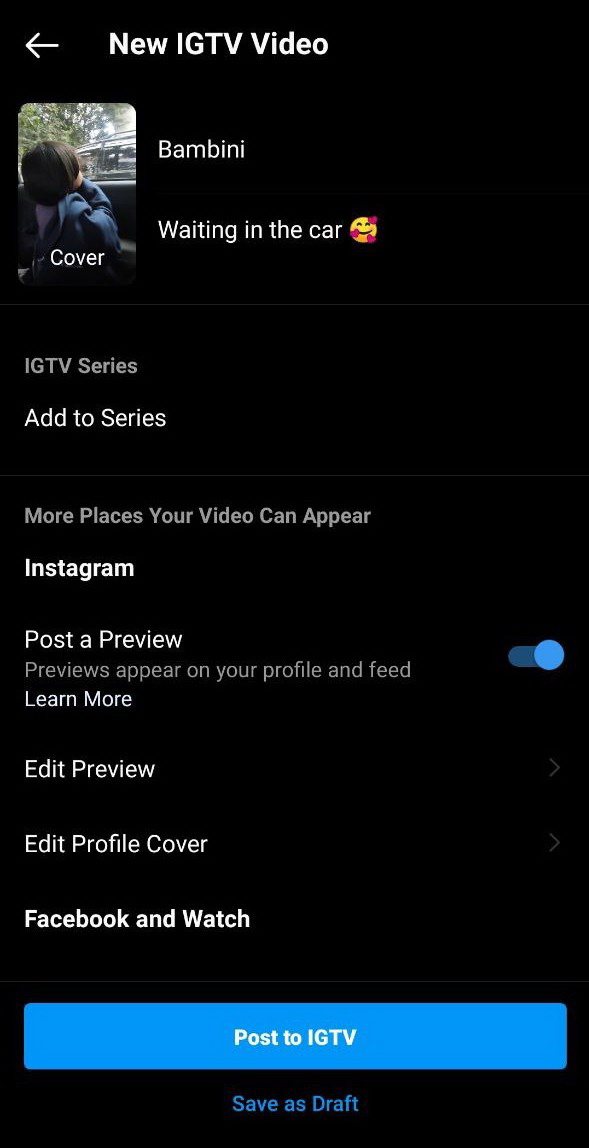
Step 2: Select the videos you want to upload from the album, add a cover image, title and description for the video. Then click “Post”.
You can also upload horizontal videos to IGTV. Just enter the app, click the IGTV button at the top of the home page. Then click “+” to select the video you want to upload, and then click “Next”. The video will rotate vertically or horizontally depending on how you hold the device.
Part 3: How IGTV Differs from Regular Instagram Posts?
|
|
IGTV |
Reels |
Stories |
Posts |
|
Video type |
Long video |
Short video |
Temporary images/videos |
Permanent images / short videos |
|
Video duration |
15 seconds to 60 minutes |
Up to 90 seconds |
Up to 60 seconds |
Up to 60 seconds |
|
Video format |
from 4:5 to 9:16 |
Vertical or square |
Vertical (9:16) |
Square (1:1) or Vertical (4:5) |
|
File format |
MP4 |
MP4 |
JPG, PNG, MP4 |
JPG, PNG, MP4 |
|
Saving duration |
Permanent preservation |
Permanent preservation |
Disappear after 24 hours |
Permanent preservation |
|
Display position |
Separate IGTV page |
Reels page and the Explore page |
Stories page: Visible only to followers |
Post page |
|
Recommendation algorithm |
Less recommended for non-followers |
Wide-scale promotion |
Only recommended for existing followers |
Less recommended for non-followers |
|
Applicable scenarios |
Long tutorials, documentaries, product demonstrations |
Short entertainment content, rapid brand exposure |
Limited-time discounts, behind-the-scenes footage, question-and-answer interactions, and other daily interactions |
High-quality images, brand image presentation, product promotion |
Part 4: Pros and Cons of IGTV
|
|
Pros |
Cons |
|
Video Specifications |
Video length can reach 60 minutes, suitable for creating in-depth long videos such as tutorials and documentaries, breaking the 60-second limit of regular posts. |
There are requirements for the size of video files, the maximum size for a 10-minute video is 650MB. High-quality videos have to be compressed and adjusted before being uploaded. |
|
Production and Release |
Videos can be uploaded through both mobile and PC. |
Long videos require more planning, shooting and editing, which may involve higher production and time costs, and are not suitable for scenarios that require rapid output. |
Part 5: How to Share an IGTV Video
1. Use Built-In Sharing Feature
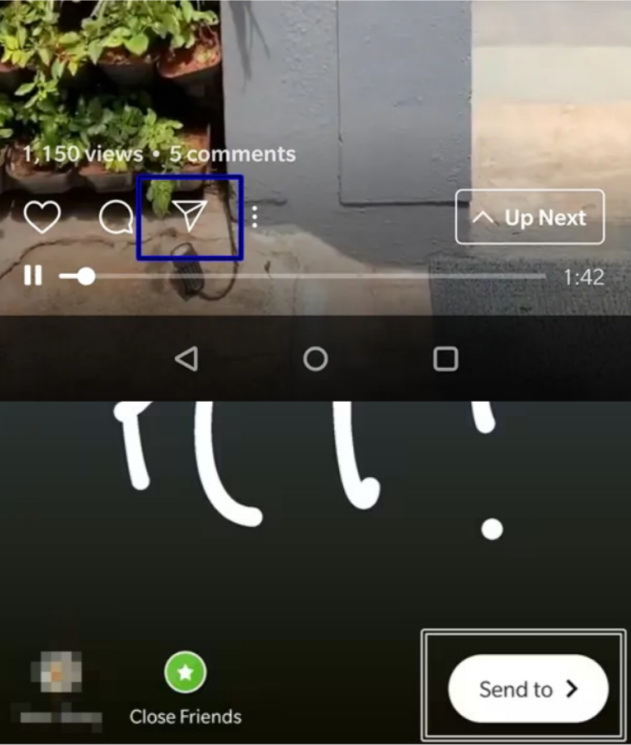
If you want to increase the exposure and view count of the IGTV videos, you can share your or others’ IGTV videos to Stories through Instagram’s built-in sharing feature. Here are relevant steps:
Step 1: Visit your Instagram page, click the “IGTV”, open the video you want to share, and click the share icon.
Step 2: Click “Add video to your story” in the menu, and the system will enter the Stories editing interface. After you edit the content, click “Send to” at the bottom right of the screen.
2. Use CleverGet Recorder to Record and Share
In addition to the built-in feature of IGTV Instagram, you can also use professional screen recording tools like CleverGet Recorder to convert Instagram video into MP4 to share them to other platforms or devices.
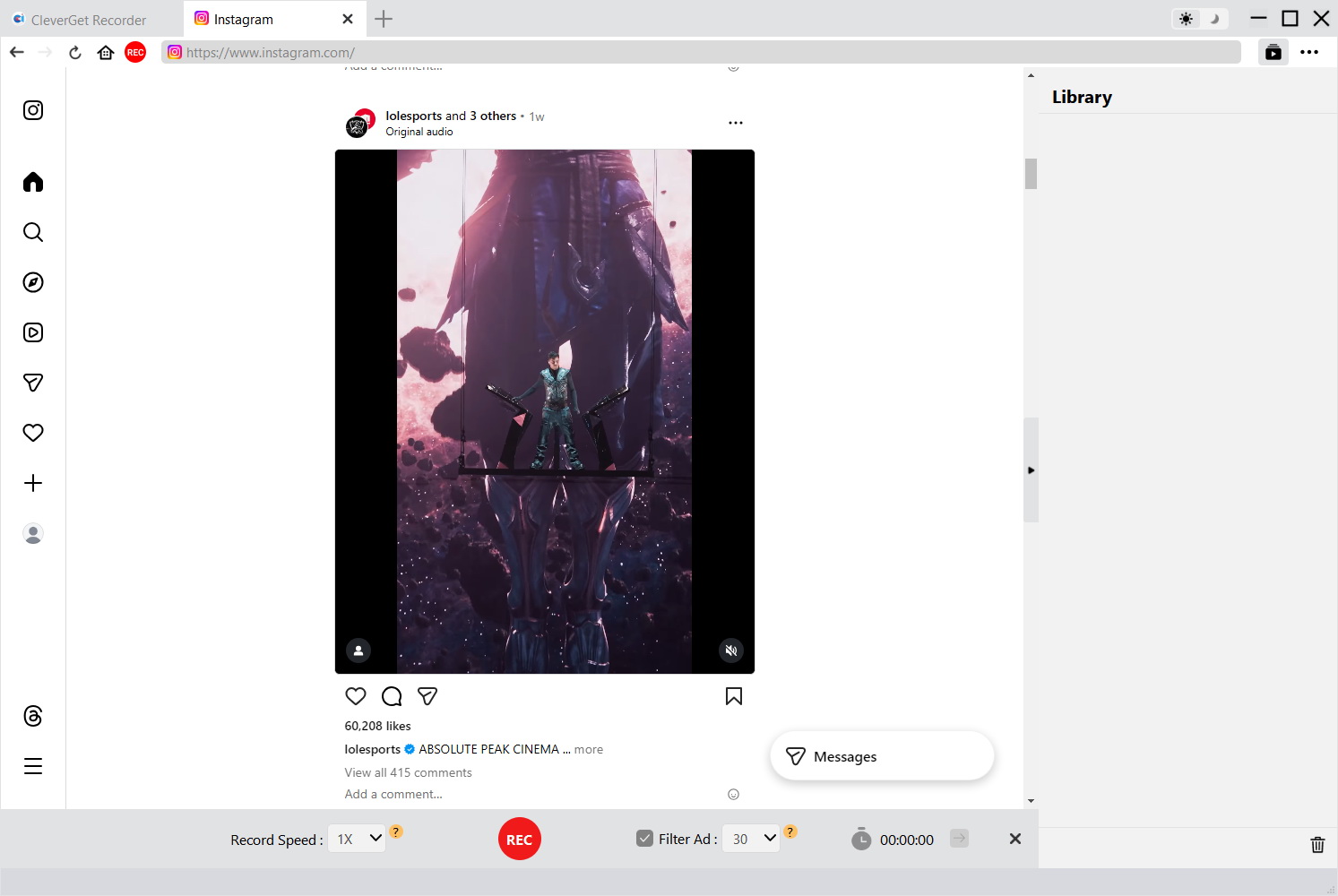
Step 1: Open CleverGet Recorder, and you can set the recording parameters according to your preferences on the main interface.
Step 2: Use the built-in browser of CleverGet Recorder to visit Instagram, log into your Instagram account, and find the IGTV video you want to record.
Step 3: When the video is played, the system will detect the playing screen. Then, click the red recording button at the bottom to start the recording. After the video finishes, click this button again to end recording.
Step 4: After the recording is completed, the system will save the video file to the file for later viewing or sharing.
Part 6: Conclusion
For those who’re interested in long videos, IGTV on Instagram provides a convenient way for entertainment. But it is worth noting that with the change in user habits, the IGTV section was shut down by Instagram in 2022. Nowadays, Instagram has integrated the short-video and long-video sections into a unified “Instagram Video”, which allows users to publish and watch short videos ranging from 3 seconds to 60 minutes. Readers are encouraged to explore and choose based on their own needs.
CleverGet Recorder

 Try for Free
 Try for Free
 Record on-demand videos for free;
Record live streams for free;
Record DRM-protected streaming content;
Support up to 4K resolution;
Record videos as MP4/MKV files;
Allow scheduled recording;
Skip ads during recording.
 English
 Deutsch
 日本語
日本語 French
 한국인
한국인 Italiano