


 Try for Free
 Try for Free
Share article:


Hulu Screen Limits: How Many People Can Watch Hulu at Once?

2026-03-24 ・ Related to: CleverGet Hulu Downloader
44 Views
Summary:
- Understanding the Hulu screen limit is essential if you share your account with family or watch Hulu on multiple devices. This guide explains how many people can watch Hulu at once, how different plans affect simultaneous streams, and how to watch Hulu content offline without screen restrictions.
If you see this message "Too many people are watching right now" when you want to stream Hulu, you’ve encountered Hulu’s simultaneous streaming restrictions. Streaming services like Hulu often limit how many devices can play content at the same time. Many users assume that because Hulu allows multiple profiles and devices, unlimited viewing is possible. In reality, active Hulu streams are restricted based on your subscription plan. This post explains the Hulu device limit, how Hulu simultaneous streaming works, and how you can manage or bypass these Hulu simultaneous stream limitations to watch your favorite Hulu videos on multiple devices.
Quick AccessCLOSE
- How Simultaneous Streaming Works on Hulu?
- How Many People Can Watch Hulu at Once by Plan?
- Common Hulu Streaming Errors and How to Fix Them
- Error 1: "Too Many People Watching Hulu Right Now"
- Error 2: Hulu Playback Blocked on a New Device
- Error 3: Hulu Streams Stop Randomly
- How to Watch Hulu Offline Without Hulu Screen Limits?
- FAQs
How Simultaneous Streaming Works on Hulu?
Some people might mistake Hulu logins or profiles as simultaneous streams. Actually it is not. You can log into your Hulu account on multiple devices like smartphones, tablets, smart TVs, streaming boxes, and web browsers. But the logins are not counted as Hulu screen limits.

The Hulu simultaneous streams count only devices actively playing back video. The moment a Hulu video starts playing on a device, Hulu counts that device as an active stream. For example, if you have logged into your Hulu account on 5 devices, but only are playing Hulu video on 2 of them, Hulu will count 2 devices into its simultaneous stream list.
Another important note is that all types of Hulu content count toward the Hulu screen limit, including: on-demand movies and TV shows, Hulu originals, Live TV channels, and recorded DVR content. This means the Hulu Live TV screen limit is also included in the general streaming rules unless you purchase an add-on. And meanwhile, every device in streaming counts, even you stream them in the same profile. That means if you stream a Hulu movie on your smart TV, an episode on your tablet, and a live streaming sport channel on your phone, Hulu will count the total streams as 3 even if you stream these Hulu contents on 3 different devices under the same profile. If your plan allows only two simultaneous streams, the third device will receive an error message.
How Many People Can Watch Hulu at Once by Plan?
To be more accurate, how many simultaneous streams do Hulu provide? Actually, this depends on which Hulu plan you subscribe. The below table will show you how many simultaneous streams you can get under different Hulu plans:
| Subscription Plan | Max simultaneous streams/devices |
| Hulu Standalone Plan (With/Without Ad) | 2 |
| Hulu + Live TV Plan | 2 |
| Hulu Unlimited Screens Add-On | – Unlimited streams at home. – Up to 3 mobile streams outside your home network. |
However, it should be noted that the Hulu Unlimited Screens Add-On is only available for Hulu + Live TV plan subscribers.
Common Hulu Streaming Errors and How to Fix Them
There are multiple Hulu streaming errors for simultaneous streaming. The below are the 3 most commonly seen Hulu streaming errors, with detailed solutions to fix them.
Error 1: "Too Many People Watching Hulu Right Now"
Sometimes when you try to play a Hulu video on your device, you might see "Too Many People Watching Hulu Right Now" error. This happens when the simultaneous streams exceed your plan allowance. It is the most common Hulu screen limit error. You can try the below solution to fix it:
1. Stop playback on another device.
2. Sign out from unused devices.
3. Or upgrade to Hulu Unlimited Screens.
Sometimes simply refreshing the app or restarting the device also resolves the issue.
Error 2: Hulu Playback Blocked on a New Device
This happens when you try to stream Hulu on a new device. Hulu may block playback temporarily. It happens due to device verification limits, too many registered devices, suspicious login activities, etc. You could try to:
1. Log out of Hulu on other devices.
2. Remove unused devices in account settings.
3. Or verify your device again.
Error 3: Hulu Streams Stop Randomly
Sometimes Hulu stops playing content even when you haven’t exceeded your streaming limit. This happens mostly due to the network, device compatibility, app cache, etc. You can try to:
1. Restart the Hulu app.
2. Restart your router.
3. Update the Hulu app.
4. Clear device cache.
Also read: Is Hulu Not Working on Your Smart TV? How to Fix?
How to Watch Hulu Offline Without Hulu Screen Limits?
As mentioned above, if you come across the Hulu device limit frequently, you can try to log out on another device, upgrade to Hulu + Live TV plan with extra Hulu Unlimited Screens add-ons, refresh your device or playback, clear cache, etc. However, these solutions actually do not solve this issue permanently. The most practical solution is to download Hulu content as standalone offline file to watch offline without any playback limit. CleverGet Hulu Downloader is a powerful Hulu video downloader that can help you batch download Hulu on-demand videos to MP4/MKV files for unlimited offline watching.
-
- Download Hulu movies and shows at up to 1080P.
- Batch convert Hulu to MP4 without quality loss.
- Download multiple subtitles and audio tracks.
- Save subtitles as SRT/SUP file or pack into video.
- Remove ads for ad-free offline viewing.
Different from the official download feature, which enables you to download Hulu videos within the Hulu app with multiple limitations, CleverGet Hulu Downloader enables you to save Hulu on-demand videos as standalone MP4/MKV files without any limit. You can refer to the below guide to learn how to download Hulu videos for unlimited offline watching:
Step 1. Download, install and kick off CleverGet on your computer.
Step 2. Click the "More" option at the top-right corner and then choose "Settings" option to enter the Settings panel, where you need to set download directory.
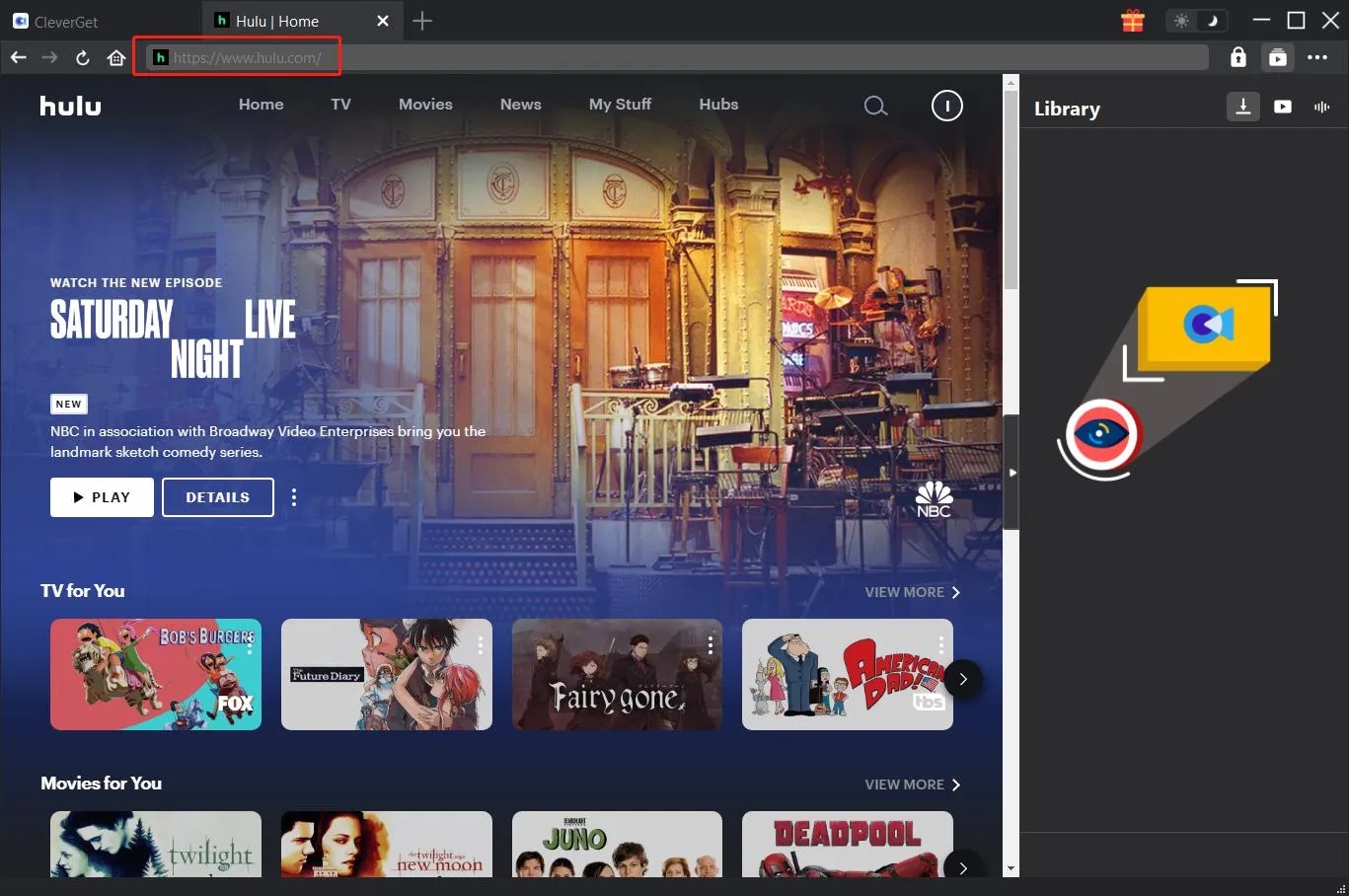
Step 3. Open Hulu website, log in and play back target video.
Step 4. Click the round blue button at the bottom right corner to parse target video.
Step 5. Choose download options, output format, subtitles, and audio tracks.
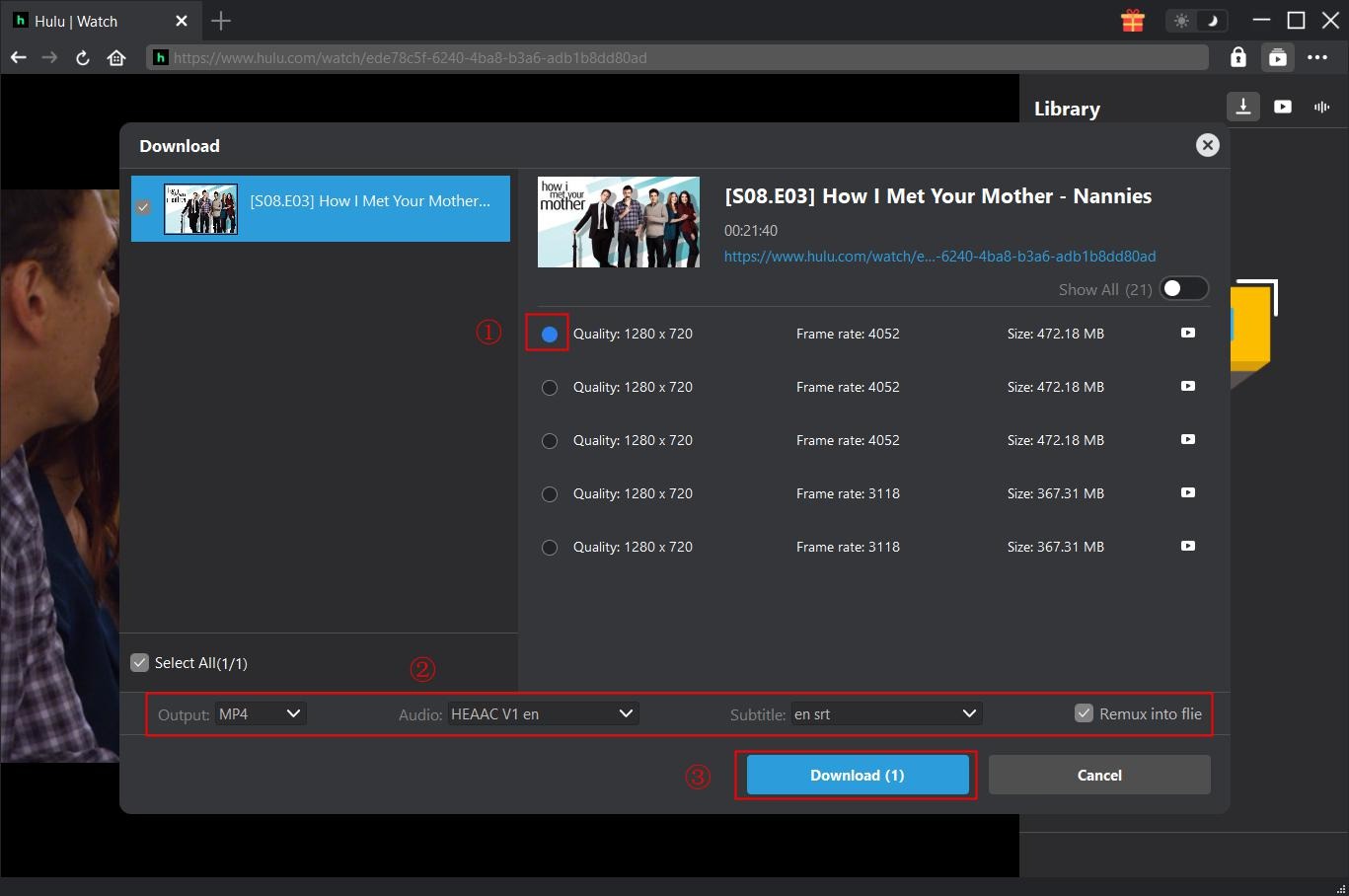
6. Finally, click the blue "Download" button at the bottom to start downloading Hulu videos.
Then, you only need to wait for the download to complete. Once the downloads complete, you will get standalone MP4 or MKV files, which could then be played back on various media players and portable devices without any limitation.
FAQs
1. How many people can watch Hulu at once?
For most plans, Hulu allows two devices for streaming simultaneously. If you are the Hulu + Live TV plan subscriber and add the Hulu Unlimited Screens upgrade, unlimited streams are allowed within your home network and up to 3 devices are allowed outside of your home.
2. How many people can watch Hulu Live at once?
The Hulu Live TV screen limit is also two streams by default. Adding the Unlimited Screens add-on removes the restriction for devices at home and reaches up to 3 devices for simultaneous streaming outside of your home.
3. Is there a Hulu device limit?
Hulu does not strictly limit how many devices you can log into your account, but limits the number of simultaneous streaming upon your plan.
4. Does downloaded Hulu content count toward the streaming limit?
No. Downloaded content for offline watching does not count toward the Hulu screen limit.
5. Can I share my Hulu account with family?
Yes. Hulu allows multiple profiles and device logins, but simultaneous streaming is restricted unless you upgrade your plan.
Conclusion
Generally, Hulu limits up to 2 devices for simultaneous streaming. But if you upgrade your subscription plan to the Hulu + Live TV and add the Unlimited Screens add-on, you will get unlimited devices at home for simultaneous streaming and up to 3 devices for outside of your home. The most reliable solution is to download Hulu videos with reliable Hulu video downloader like CleverGet, which helps you get standalone offline files for unlimited playback on various devices, be it simultaneous or not.
CleverGet Hulu Downloader

 Try for Free
 Try for Free
 Download Up to 8K Videos, Live Stream and even paid streaming videos in batch or individually from 1000+ websites like YouTube, Facebook, Twitter, Twitch.tv, Max, Netflix, Amazon, Disney+, Hulu, Apple TV+, Paramount+, Discovery+, etc. Record online video at up to 4K resolution and 5X recording speed from various streaming services to MP4/MKV files without ads.
 English
 Deutsch
 日本語
日本語 French
 한국인
한국인 Italiano