


 Try for Free
 Try for Free
Share article:


How to Get Rid of Ads on Disney+

2025-12-22 ・ Related to: CleverGet Disney Plus Downloader
67 Views
Summary:
When watching Disney Plus movies online with family, friends, or by yourself, do you find it annoying that ads keep popping up when the story starts to get interesting? Luckily, there are several ways to get rid of Disney Plus ads.
Outline
Want to know how to skip the Disney Plus ads? There are ways to stop ads on Disney Plus. One way is to use a Google Chrome extension. You can also use professional tools like Disney Plus Video Downloader to download Disney Plus movies and get movies that will never have ads again. Let’s take a closer look at these methods now!
Does Disney Plus Have Ads and Why
Disney Plus now has ads. In the US, the option of Disney Plus those had ads began to show up in December 2022. It’s slowly making its way to the UK, France, Germany, and other places. Ads are different depending on what they’re about, where they’re shown, and other factors.
Some Disney Plus users don’t understand why there are ads since the service added several payment plans with ads. In fact, advertising helps Disney+ make more money from subscriptions, which it then spends on making new shows and movies.
Netflix was the first video service to bring out a plan with ads. Since it did, other companies like Amazon, Hulu, and Max have slowly started to use plans like this one. That keeps Disney+ in the streaming market, which is already very full.
No matter what plan you choose, please keep in mind that some live and recorded Disney+ shows will have ads. Along with the videos you watch, you may also see ads or paid material.
Official Method: Upgrade to Ad-Free (No Ads) Plan
How to remove the ads on Disney+? Users who want to avoid annoying ads should simply change their current subscription to one that doesn’t have any ads. This way, users can binge-watch Disney+ without any breaks.
Step 1: Use the browser on your computer or phone to sign in to your Disney+ account.
Step 2: Click the Profile button in the upper right corner. Then, from the drop-down menu, choose "Account."
Step 3: Click on the payment plan you want to use under "Subscription."
Step 4: To the right of the present plan, click the "Change" button.
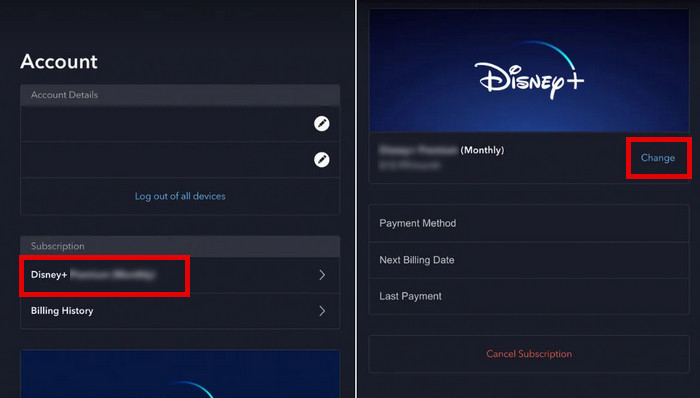
Step 5: Pick the "No Ads" plan and click "Agree & Subscribe" to change your Disney+ plan.
Alternative Ways to Reduce or Avoid Ads
If you are unwilling to pay for the subscription, there are also many other ways to get around the ads! Read on to find out more.
1. Use an Ad Blocker
Add-ons for Google Chrome are another simple way to skip Disney Plus ads. Adding the right app, like Disney Plus Ad Blocker for Google Chrome, will help you watch better by blocking annoying ads.
Step 1: Look for Disney Plus Ad Blocker in the Chrome Web Store. After that, click "Add to Chrome" to add the add-on to your Chrome.
Step 2: Click on the first icon to the right of the search bar in the upper right area. After that, pick the Disney Plus Ad Blocker.
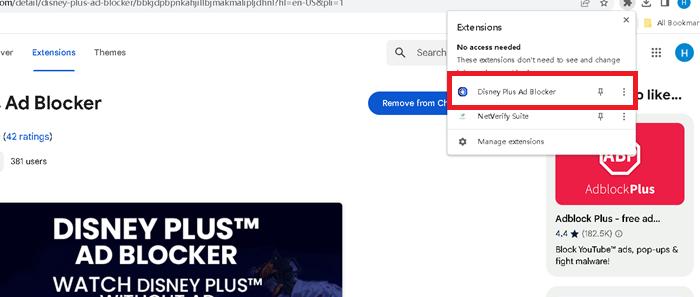
Step 3: In the new window that comes up, click on Visit Website. Just click on this to go to the main screen of Disney Plus. From there, you can start searching for your favorite TV shows without any ads getting in the way.
This tool makes it easy to stop Disney Plus ads, but it doesn’t always work. It often skips the "Previously" part at the start of a show and may end the credits early to start the next episode right away. Especially if you like these parts, this could make watching less fun.
2. Download Content for Offline, Ad-Free Viewing
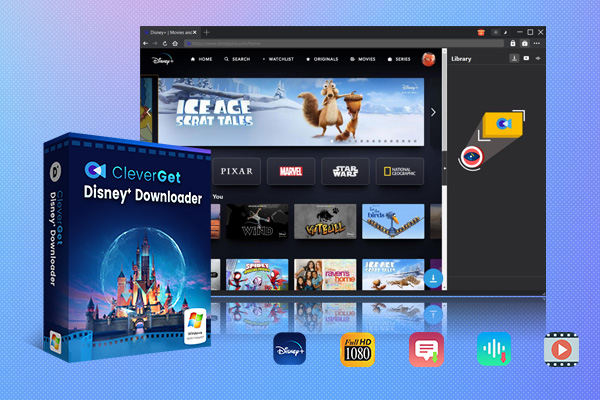
You can stop Disney Plus commercials in both of the ways above, but they have some difficulties. For example, you have to pay for a plan that doesn’t show ads, and sometimes they can be problematic. CleverGet Disney Plus Video Downloader might help you get over these constraints so you can view movies without commercials or interruptions. You may save your favorite Disney movies forever on a Mac or Windows computer so you can watch them whenever you want without being interrupted.
CleverGet Disney Plus Downloader is the greatest Disney Plus video downloader because there aren’t many others like it. It provides a number of useful features and downloads videos swiftly, reliably, and affordably. Customers may now download Disney+ videos in 720P quality, download more than one TV episode at a time, employ GPU hardware-accelerated technology, and download audio tracks and subtitles whenever they wish. This makes it easier for users to enjoy Disney+ content offline without any constraints.
-
CleverGet Disney Plus Downloader
Professional Disney Plus video downloader to download on-demand videos like movies and series at 720P quality with selected subtitles and audio tracks.
- Download and convert Disney Plus video to MP4/MKV.
- Batch download TV episodes across seasons from Disney+.
FAQs
1. How long do the Disney Plus advertisements stay on? When will I be able to close the ads?
According to what several people have said, Disney Plus normally has 3 to 4 ads. These can happen before or during the show. Commercials last between 15 and 60 seconds. Commercial breaks usually last between 45 and 60 seconds, they can go as long as 60 seconds.
2. Why do advertisements show up on Disney Plus when you can get a plan that doesn’t include any?
Even if you have the Disney+ (No commercials) subscription, you can still see some commercials, like trailers, branded content, or sponsor messages. During live TV streaming and special events, there may also be gaps for ads.
3. Is the Disney Plus package with advertisements worth it?
The With Ads plan is a good option for consumers who want to save money because the prices of ad-free subscriptions on most streaming services are increasing. With this subscription, you can still view all of Disney+’s movies and TV shows. There is advertising, and you can’t record videos, but for the price, it’s an excellent offer. The first two choices above will help you get rid of or skip Disney Plus advertising.
Conclusion
In short, I talked about some smart techniques to get rid of advertisements on Disney Plus. Using an ad blocker from another firm is a fantastic approach to stop adverts on Disney Plus. People who want to view without commercials would also find a robust Disney+ downloader beneficial. Based on your budget and tastes, you can choose the best option for you.
CleverGet Disney Plus Downloader
 Try for Free
 Try for Free
 Download Disney+ videos in up to 720P resolution
Save Disney+ content as MP4 or MKV files
Download Disney+ movies, shows, and exclusive originals
Batch download full seasons and multiple episodes.
Remove ads during Disneyplus video downloads
 English
 Deutsch
 日本語
日本語 French
 한국인
한국인 Italiano